
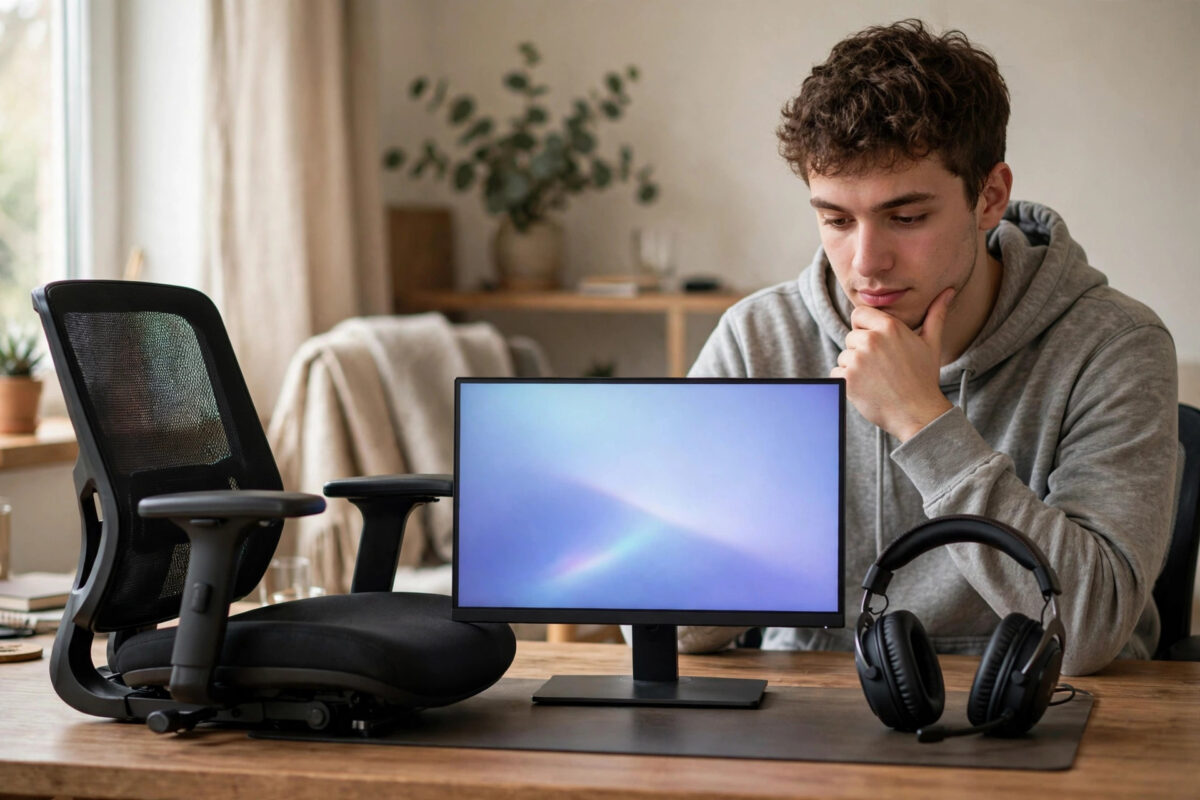
You have limited money and three things on your wishlist: a better chair, a better monitor, and a better headset. All three promise to improve your gaming, all three are advertised like essentials, and you can only afford one or two right now. Choosing the wrong order means months of sitting in pain or squinting at a dull screen while the item you bought gathers dust.
The right order depends on how and how long you play, plus what you already own. There is a clear logic to it, though. Fix the thing that is hurting your body first, then the thing you look at, then the thing you listen through, adjusted for your situation. This guide walks through that decision properly so your limited money does the most work.
Quick Answer
For most players, prioritise in this order: monitor first if your current screen is old, small, blurry, or limited to 60 Hz, chair first if you get back, neck, or shoulder pain during sessions, and headset last unless you play team games where voice chat is essential. In short, fix pain before picture, and picture before sound, unless multiplayer communication is the main reason you play.
Start With an Honest Look at What You Already Have
Before ranking anything, score your current gear honestly. A five-year-old headset that still works fine is not urgent, even if it looks scruffy. A chair that leaves you stiff after forty minutes is urgent, even if it was expensive. Ask yourself three questions.
- Does anything hurt, ache, or go numb when I play for my normal session length?
- Do I miss visual details, struggle to read text, or feel that games look washed out or choppy on my screen?
- Do teammates struggle to hear me, or do I miss footsteps and direction cues in games?
The item linked to your strongest yes is your real priority, regardless of generic advice. The sections below explain why each item usually lands where it does, so you can match the logic to your answers. If your current problem is actually your display settings rather than the display itself, our guide on the best monitor settings for gaming brightness and response time is worth trying for free before you spend anything.
The Case for the Monitor First
Your monitor affects every game, every minute. You cannot work around a bad screen with skill or accessories. Moving from an old 60 Hz office monitor or a dim TV panel to a proper 1080p IPS monitor at 120 Hz or 144 Hz changes smoothness, clarity, and reaction-based play in a way you feel instantly. Text becomes readable, motion becomes clean instead of smeary, and eye strain often drops because you stop squinting at a dim, low-contrast picture.
Choose the monitor first if any of these are true for you. Your screen is under 24 inches and you sit at a desk. Your screen is limited to 60 Hz while your console or PC can output more. Your panel has poor colours, bad viewing angles, or noticeable ghosting trails behind moving objects. Or you play competitive shooters, racing games, or sports titles where seeing motion clearly is part of performing well.
What to Buy Without Wasting Money
Aim for 24 to 27 inches, 1080p, IPS panel, and the highest refresh rate in your price range, ideally 144 Hz. Do not pay extra for 4K at this budget level. Check the ports match your console or PC. Second-hand monitors in this class are common and excellent value.
The Case for the Chair First
A chair never makes a trailer look exciting, which is why people delay it, but it is the only item on this list that affects your health. If you finish sessions with lower back ache, a stiff neck, sore shoulders, or numb legs, the chair jumps to first place without debate. No monitor upgrade is worth playing in pain, and pain also ruins your focus and reaction time, so fixing it improves performance too.
Choose the chair first if you play for two or more hours at a time, if you also use the same seat for work or study, or if you currently sit on a dining chair, stool, sofa, or bed for desk gaming. In those cases almost any properly supportive seat is a major upgrade.
What to Buy Without Wasting Money
At a limited budget, a good office chair almost always beats a cheap gaming chair. Look for adjustable height, lower-back support, padding that does not flatten in a month, and armrests that let your shoulders relax. Your feet should be flat on the floor and the seat edge should not dig into your knees. Ignore racing logos completely.
The Case for the Headset First
The headset is normally third, not because sound is unimportant, but because most people already have something that works. TV speakers, basic earbuds, or an old headset will carry you while a painful chair or terrible screen cannot be worked around. Audio upgrades are also the cheapest of the three, so the headset is the easiest to add later with a smaller amount of saved money.
The headset jumps the queue in specific situations. Choose it first if you mainly play team multiplayer and your microphone is broken or missing, because communication wins rounds. It also jumps up if you play in a shared room at night and speakers disturb others. Then a headset makes gaming possible at all, not a luxury.
What to Buy Without Wasting Money
A wired headset from a known brand will beat a flashy wireless model at the same price on sound and microphone quality. Prioritise a clear microphone, comfortable ear cups, and compatibility with your controller or PC. Ignore surround software and RGB lighting.
A Simple Decision Flow for Your Money
- If you get pain or numbness when you play, buy the chair first. Full stop.
- If you have no pain but your screen is small, dim, blurry, or stuck at 60 Hz while your system can do more, buy the monitor first.
- If your screen and seating are both acceptable but you cannot communicate in team games, or you disturb others with speaker sound, buy the headset first.
- With money for two items, the most common best pair is monitor plus headset for short sessions, or chair plus headset for long sessions on an acceptable screen.
- Save the remaining item as your next single upgrade instead of spreading the money thinly across three mediocre items.
That last point matters. Three cheap, poor items will disappoint you three times. One or two decent items will genuinely improve every session, and the third can follow later. Spreading a limited budget evenly is the most common and most expensive mistake, because low-end versions of all three categories fail fast and get replaced sooner.
How Session Length Changes the Answer
Short-session players, under an hour at a time, should usually rank monitor first, headset second, chair third. Long-session players, two hours and above, should rank chair first, because support decides whether those hours feel good or punishing. Competitive team players should push the headset up, because a clear microphone is a competitive tool. For healthy habits, the NHS guide to exercise and physical wellbeing is a useful reminder that movement breaks matter alongside a good chair.
Common Mistakes to Avoid
- Buying by looks: The most photographed setup item is rarely the most useful one for your money.
- Ignoring what you already own: Replacing a working headset while sitting on a broken chair is backwards spending.
- Buying a cheap gaming chair over a good office chair: At low prices, office chairs offer better padding, support, and durability.
- Paying for resolution you cannot use: A cheap 4K monitor on a budget system wastes money that high refresh rate would use better.
- Splitting the budget three ways: One proper upgrade beats three weak ones every time.
- Forgetting fit: Chair size, headset clamping force, and monitor distance are personal. Check measurements and returns policies.
Conclusion
Prioritise by problem, not by advertising. Pain means chair first. A weak, slow, or tiny screen means monitor first. Broken communication or shared-room play means headset first. For everyone else, the reliable order is monitor, then chair, then headset, with session length nudging the chair higher the longer you play. Spend your limited money fully on the item that solves your biggest problem, enjoy the difference in every session, and let the next upgrade wait until you can do it properly too.
Frequently Asked Questions
If I can only afford one item, which gives the biggest improvement?
For most players it is the monitor, because it improves the picture and smoothness of every game immediately. The exception is pain. If your current chair hurts you, the chair gives the biggest improvement because it fixes every session, in and out of games.
Is a gaming chair better than an office chair on a budget?
Usually no. At low and mid prices, office chairs tend to have better lumbar support, thicker padding, and stronger build quality. Expensive gaming chairs can be excellent, but cheap ones often prioritise looks over support.
How much should I spend on a headset compared to a monitor?
Much less. A solid budget headset costs a fraction of a good monitor and still delivers clear chat and good game sound. This price difference is another reason the headset often comes last. It is the easiest upgrade to afford later.
Will a better monitor really help if I play on console?
Yes, if your console supports higher refresh rates and your current display does not. PS5 and Xbox Series X|S can output 120 Hz in supported games, and a suitable monitor also gives you lower input lag than most TVs without game mode enabled.
Should I upgrade my chair even if I play on a sofa?
If you are a sofa and TV player with no discomfort, a gaming chair is low priority and your money is better spent on the display or headset. Chair priority applies mainly to desk setups and anyone who also sits in the same seat for work or study.

Leave a Reply