
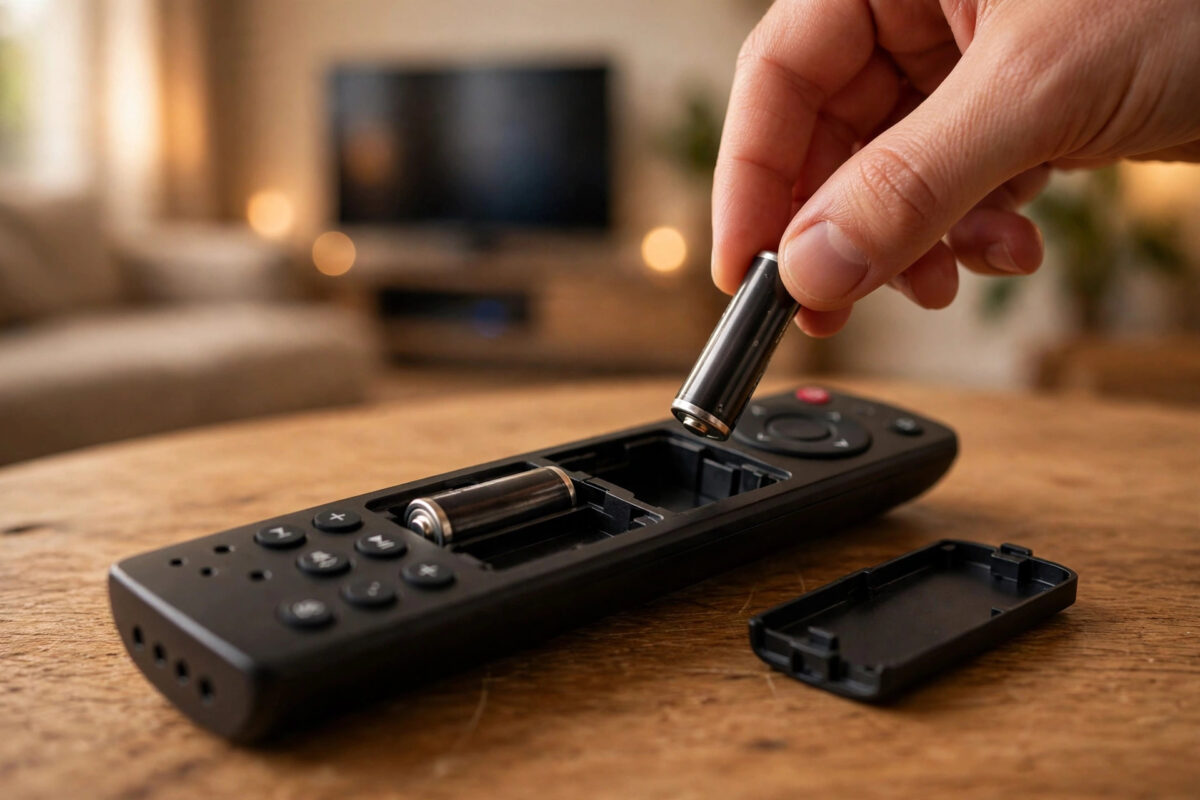
You changed the batteries in your Firestick remote, expecting it to work better than before, and instead it stopped working completely. It happens to a lot of people, and it feels unfair because fresh batteries should fix problems, not cause them. The reassuring truth is that the remote is rarely broken in this situation.
In almost every case, the cause is something small: batteries fitted the wrong way, a weak pair from the drawer, or a pairing connection that was lost while the remote had no power. This guide helps you find and fix the cause in minutes.
Quick Answer
Remove the new batteries and refit them, making sure both point in the direction shown inside the remote and are from a fresh pack. Then hold the Home button for ten seconds near the TV to re-pair the remote with your Firestick. If it still does not respond, restart the Firestick by unplugging it for 30 seconds and try pairing again.
Why Changing Batteries Can Break the Connection
Understanding what went wrong makes the fix much less stressful. Your Firestick remote talks to the stick using Bluetooth, which is a wireless connection that the two devices must agree on and remember.
While the remote has no batteries inside, it has no power at all. Usually it remembers its pairing during a quick battery swap. But if the remote sits empty for a long time, if the new batteries deliver poor power, or if a button gets pressed repeatedly while it has weak power, the connection can drop. The stick then ignores the remote until you pair them again.
The other common causes are purely physical. Batteries fitted in the wrong direction give no power at all. A slightly bent battery contact or a dirty terminal can block the flow. And batteries that have sat in a drawer for years may show as new but hold very little charge. The checks below cover all of these, in the order you should try them.
Step 1: Check the Batteries Themselves
Start here, even if you feel sure the batteries are fine. This step solves more cases than any other.
- Slide off the remote cover and take both batteries out.
- Look inside the battery space. One end shows a spring and the other a flat contact, with plus and minus marks moulded into the plastic.
- Refit the batteries so the plus end of each battery matches the plus mark. On Firestick remotes the two batteries usually point in opposite directions, which catches many people out.
- Press each battery down firmly so it sits flat and does not rattle.
- If the remote still shows no sign of life, throw that pair away and open a completely fresh pack. Do not mix one old and one new battery.
While the batteries are out, look at the metal contacts. If you see white or green crust, or the contacts look dull, wipe them gently with a dry cloth or a cotton bud. A clean, shiny contact carries power far better. Also check that no spring is bent flat. If one is, you can lift it very slightly with a fingernail so it presses against the battery properly.
Step 2: Check for Any Sign of Life
With good batteries fitted correctly, test whether the remote is awake at all. Some Firestick remotes have a small light that flashes when you press a button or during pairing. Others give no light but still work.
Stand a few feet from the TV, point the remote at the screen, and press the Home button. If the menu moves or the home screen appears, the remote was simply fitted wrong and you are finished. If nothing happens, keep the batteries in and move to re-pairing. Do not assume the remote is dead yet, because a healthy remote with a lost pairing looks exactly the same as a broken one: totally silent.
Step 3: Re-Pair the Remote With the Home Button
This is the key fix for a remote that lost its connection during the battery change. Re-pairing rebuilds the Bluetooth link between the remote and the stick.
- Make sure the TV is on and showing the Firestick screen.
- Stand within about ten feet of the TV, closer if possible.
- Press and hold the Home button for a full ten seconds. Count slowly and do not let go early.
- Watch for a flashing light on the remote or an on-screen message confirming pairing.
- Release the button and test the navigation ring and Select button.
If the first hold does not work, wait thirty seconds and repeat it. Two or three attempts are sometimes needed, especially if the stick was busy. If your household uses several sticks, make sure you are standing near the correct TV, because the remote will pair with the nearest listening stick. Once paired again, test a few buttons including volume, if your remote supports it. For general remote care, Amazon’s official Fire TV remote troubleshooting guide lists the same checks in model order.
Step 4: Restart the Firestick and Pair Again
If re-pairing fails, the stick itself may need a fresh start before it will accept the connection. You do not need the remote for this step.
- Unplug the Firestick power adapter from the wall and wait 30 seconds.
- While you wait, remove the remote batteries and leave them out.
- Plug the Firestick back in and let it load fully to the home screen.
- Fit the batteries again, stand close, and hold the Home button for ten seconds.
This order matters. Pairing against a freshly restarted stick succeeds far more often than pairing against a stick that has been running for weeks. If the remote pairs now, the earlier failure was a software glitch on the stick side, not a fault with your battery change. While you are sorting remotes, you may also find it useful to read our guide on Firestick remote not working fixes for every common fault, which covers buttons, voice search, and volume problems too.
Step 5: Reset the Remote Itself
If fresh batteries, re-pairing, and a stick restart have all failed, a remote reset is worth trying. The exact steps vary a little by model, but the common method for most current Alexa Voice Remotes is as follows.
- Unplug the Firestick from power and wait one full minute.
- On the remote, hold the Left button, the Menu button, and the Back button together for twelve seconds.
- Release the buttons and wait five seconds.
- Remove the batteries from the remote.
- Plug the Firestick back in and wait for the home screen or the message saying the remote cannot be detected.
- Refit the batteries and hold the Home button for ten seconds to pair fresh.
After a reset, the remote behaves like a brand-new one, so give it a moment to connect. If your model has different reset steps, check the leaflet that came with it or search for your exact remote model on Amazon’s device support hub before trying random button combinations.
Common Mistakes to Avoid
- Assuming both batteries face the same way: On most Firestick remotes they face opposite ways. Follow the marks, not your habit.
- Trusting drawer batteries: Old stock can be nearly flat even if unused. Use a sealed fresh pack for testing.
- Mixing battery brands or ages: A strong and a weak battery together deliver poor, uneven power. Always replace both at once.
- Releasing the Home button too soon: Pairing needs a full ten-second hold. Short presses do nothing.
- Giving up after one attempt: Pairing sometimes needs two or three tries after a restart. Work through the steps in order before replacing the remote.
Conclusion
A Firestick remote that dies after a battery change is almost never truly broken. Work through the simple causes first: correct battery direction, a genuinely fresh pair, clean contacts, and a ten-second Home button hold to re-pair. Add a Firestick restart if pairing is stubborn, and a remote reset only after that. In the vast majority of homes, one of these steps has the remote working again within ten minutes.
Frequently Asked Questions
Why did my remote work before the battery change but not after?
Most likely the new batteries face the wrong way, are weaker than they look, or the pairing dropped while the remote had no power. Checking fit and re-pairing fixes nearly all cases.
How long do Firestick remote batteries normally last?
With daily use, a good pair usually lasts several months. Voice searches and volume control use extra power, so heavy users may change batteries more often.
Can I use rechargeable batteries in a Firestick remote?
Yes, but some rechargeables deliver slightly lower voltage, which can cause weak signals sooner. If you have pairing trouble, test with standard fresh alkaline batteries first.
How do I control the Firestick while the remote is not working?
Use the free Amazon Fire TV app on your phone on the same Wi-Fi network, or a TV remote with HDMI-CEC enabled. Both let you navigate and open settings.
When should I replace the remote instead of fixing it?
Replace it if fresh batteries, re-pairing, a stick restart, and a remote reset all fail, and it also fails on another Firestick. At that point the remote hardware has likely failed.
Leave a Reply