
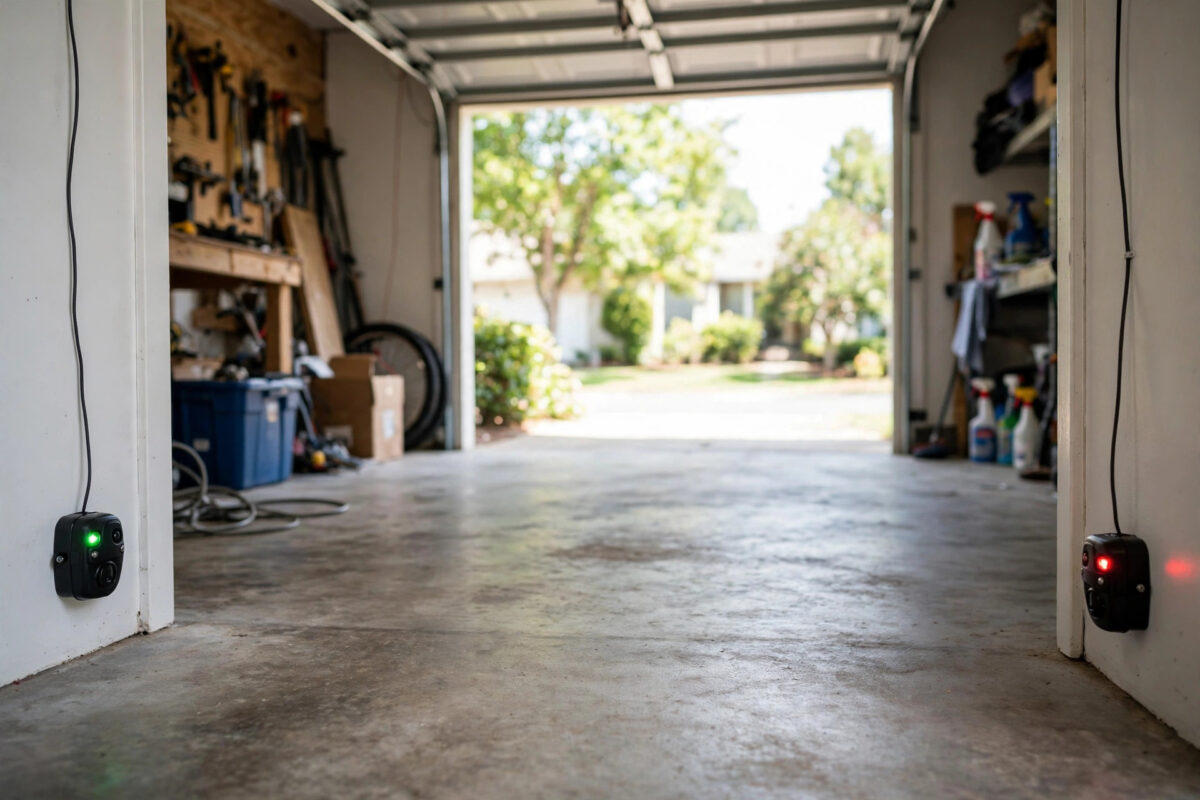
Your garage door was working fine. Then the myQ app shows a warning: “misaligned sensors.” The door may refuse to close from the app, or it closes a little and then goes back up.
This warning is about safety. Two small sensors, called safety eyes, sit near the floor on both sides of the door. They send an invisible beam across the opening. If that beam is blocked or the eyes do not point at each other, the door will not close. This protects children, pets, and cars.
The fix is usually simple. You do not need to replace the opener. Clean the lenses, straighten the brackets, and align the lights. This guide walks you through it safely.
Quick Answer
Clear everything away from the bottom of the door opening, then clean both sensor lenses with a soft, dry cloth. Check the LED light on each sensor — both should glow steadily. Loosen the wing nut on the sensor that is off or blinking, move it slowly until both lights stay solid, and tighten it again. Test the door from the wall button first, then from the myQ app.
How Garage Door Safety Eyes Work
One sensor sends the beam. The other receives it. They sit about 10 to 15 centimetres above the floor, facing each other across the door.
Each sensor has a small LED light:
- The sending eye usually shows a steady amber or yellow light when it has power.
- The receiving eye shows a green light when it sees the beam clearly.
- A blinking or dark receiving light means the beam is blocked, dirty, or poorly aimed.
Exact colours vary by brand and model, but the rule is the same: steady lights mean aligned, blinking or off means a problem. Strong sunlight hitting a lens can also confuse a sensor at certain times of day.
Never disable or tape over the sensors to bypass this error. A door that closes without a working beam is dangerous and, in many places, against safety rules.
Safety First Before You Start
- Keep children and pets out of the garage while you test.
- Never stand under a moving door.
- Do not put your hands near springs, cables, or moving chains and belts.
- This job only touches the low sensors and their thin wires. If you see a broken spring or frayed lifting cable, stop and call a garage door professional.
- Use a stable step stool if needed, not a bucket or a chair.
Step-by-Step: Clean, Check, and Align the Sensors
- Clear the opening. Move bikes, bins, boxes, tools, and leaves away from the door track and the sensor path. Even a cobweb across a lens can break the beam.
- Clean both lenses. Wipe each small round lens gently with a soft, dry or slightly damp cloth. Do not use strong chemicals or rough pads that scratch the lens.
- Check the lights. Look at both LEDs. Note which one is off or blinking. Take a phone photo if the lights are hard to see in daylight.
- Inspect the brackets. Sensors clip or screw onto brackets by the track. A knock from a bin or car tyre often bends one. Straighten a bent bracket by hand so the sensor faces straight across.
- Check the wires. Follow the thin sensor wires up to the opener. Look for cuts, pinches, loose staples through the wire, or loose ends at the terminals. A damaged wire gives the same error as a crooked sensor.
- Loosen the receiving sensor. Turn its wing nut just enough so you can move the sensor slowly. Keep your hand steady.
- Aim until the light is solid. Move the sensor up, down, left, and right in tiny steps. Watch the receiving LED. When it turns solid and stays solid, you found the beam. Hold that position.
- Tighten without shifting. Tighten the wing nut while holding the sensor still. Many failed fixes happen here — the sensor moves at the last turn. Check the light again after tightening.
- Repeat on the other side if needed. If both lights still blink, align the sending eye the same way. Small moves matter. Be patient.
- Test with the wall button. Stand inside, clear of the door, and close it from the wall control. The door should travel fully down and stay down.
- Test the safety reverse. Place a sturdy box in the doorway and close the door. The door should touch lightly and reverse. Then wave an object through the beam during closing — the door should stop and reverse. If either test fails, do not use the door remotely until it is fixed.
- Test from the myQ app. Close and open the door once from the app. The misaligned sensors warning should clear. If the app still shows the old warning, refresh it and check the door status history.
If your lights or menus differ, compare them with Chamberlain Group’s official myQ support pages, which cover sensor codes for Chamberlain, LiftMaster, and Craftsman openers.
When the Error Is Not Really Alignment
Sunlight blinding the sensor
If the error appears only at sunny times of day, bright light may be hitting the receiving eye. Swap the sensors side to side if your model allows it, or fit the small sun shields some makers offer. Note the time pattern before you change anything.
One light is completely off
No light usually means no power to that sensor. Check the wire at both ends, the terminal screws on the opener, and the outlet power. A sensor with no power cannot be fixed by aiming it.
The error returns every few days
A loose bracket, a cracked lens mount, or a track that vibrates can knock alignment out slowly. Tighten all bracket screws, and check that the track itself is firm. Repeated drift after careful alignment is a sign to replace the sensor pair — they are sold as a matched set.
Choosing a new opener with better sensors and app alerts is covered in our guide to the best smart garage door openers, if your unit is old and faults keep returning.
Mistakes to Avoid
- Bypassing the sensors: Holding the wall button to force the door down, or disconnecting the eyes, removes a life-saving feature. Never do it as a fix.
- Moving both sensors at once: You lose your reference point. Align one side at a time in small steps.
- Tightening too hard: Overtight wing nuts crack plastic mounts and shift the aim. Firm is enough.
- Ignoring the wires: A pinched or chewed wire looks exactly like misalignment in the app.
- Testing only from the app: Always test the wall button and the safety reverse in person before you trust remote closing again.
Conclusion
The myQ “misaligned sensors” error almost always comes from a blocked, dirty, or crooked safety eye. Clear the opening, clean the lenses, and aim the sensors until both LEDs stay solid. Then test closing, reversing, and app control in that order. If a light stays off or the error keeps returning, check wires and power before you replace parts. A careful ten-minute alignment restores safe, reliable closing in most homes.
Frequently Asked Questions
Why will my door open but not close with this error?
Opening does not need the safety beam, but closing does. The system blocks closing when it cannot confirm the doorway is clear, which is the safe behaviour.
Both lights are solid but the app still shows the error. What now?
Run one full close from the wall button, then refresh the app. Old warnings can linger until a successful cycle clears them. If it persists, restart the opener power for 30 seconds and test again.
Can I clean the lenses with glass cleaner?
A soft cloth, dry or slightly damp with water, is safest. Strong cleaners can cloud plastic lenses. Gentle cleaning is enough for dust and cobwebs.
How high should the sensors be mounted?
Most makers specify about 10 to 15 centimetres above the floor, facing each other at the same height. Check your manual if your brackets were remounted.
When should I call a professional?
Call a professional for a broken spring, damaged lifting cable, a sensor with cut wiring inside the wall, or an error that returns daily after correct alignment.



Leave a Reply