
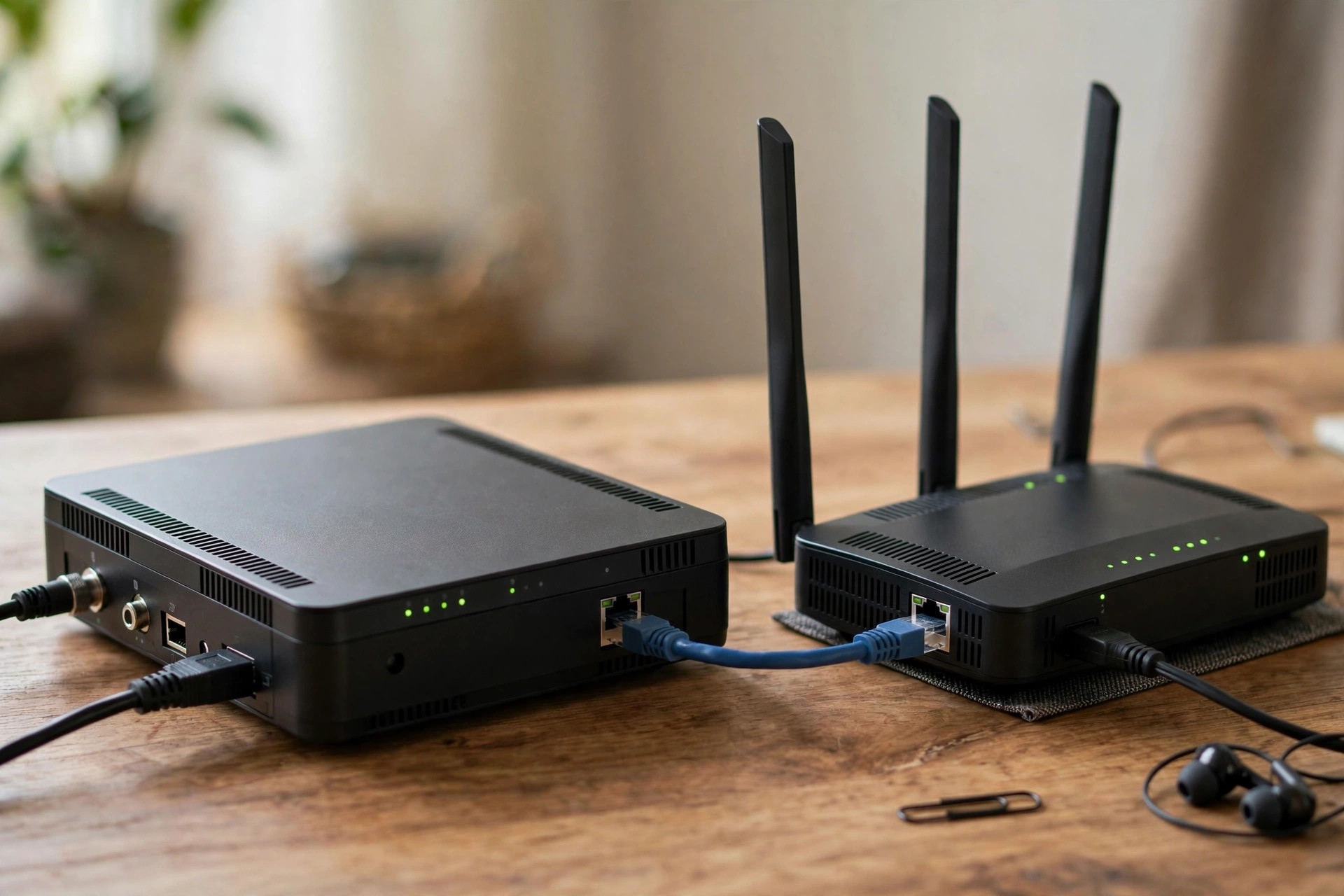
If you have ever called your internet provider about a slow connection, you have probably heard the words modem and router used as if they mean the same thing. They do not. These are two different devices doing two different jobs, and mixing them up makes troubleshooting confusing, buying equipment expensive, and home networking harder than it needs to be. Understanding the difference helps you fix problems faster, choose the right upgrade, and stop paying rental fees for equipment you may not need.
In this guide, you will learn in plain language what a modem does, what a router does, how they work together, what a combined gateway is, and how to decide what your home actually needs. No jargon is assumed, and every explanation is tied to the real boxes sitting near your TV or in your hallway.
What Does a Modem Actually Do?
The word modem is short for modulator-demodulator. A modem is the translator between your home and your internet service provider. The signal that arrives at your house, whether through a copper phone line for DSL, a coaxial cable for cable broadband, or a fiber-optic cable for full-fiber service, is not in a form your laptop or phone can use directly. The modem converts that incoming signal into digital data your devices understand, and converts your outgoing data back into a signal that can travel to your provider. This translation is the modem’s only job.
A modem gives you exactly one wired internet connection. If you plugged a single computer straight into a modem with an Ethernet cable, that computer would be online, with a public IP address assigned by your provider. But a modem on its own cannot create Wi-Fi, cannot connect ten devices at once, and offers no firewall protection between your computer and the open internet. That is why almost nobody uses a modem alone at home anymore. For a deeper technical background, this history and explanation of modems on Wikipedia covers how the technology developed from dial-up to modern broadband.
What Does a Router Actually Do?
A router does not connect you to the internet by itself. Instead, it takes the single internet connection from the modem and shares it safely among all the devices in your home. The clue is in the name: a router routes traffic. It creates your local home network, gives every phone, laptop, TV, and smart bulb its own private local IP address, such as 192.168.1.15, and directs data to the right device. When three people stream, browse, and game at the same time, the router keeps every stream separate and delivers each packet to the correct screen.
Modern routers also broadcast the Wi-Fi signal your devices connect to, run a firewall that blocks unsolicited traffic from the internet, and offer features such as guest networks, parental controls, port forwarding, and quality of service settings. A router uses a technology called NAT, or Network Address Translation, to let dozens of devices share the single public IP address from your modem. Without a router, you would need a separate public IP address and a separate connection for every device, which is neither practical nor safe.
The Key Differences at a Glance
- Connection to the internet: The modem connects your home to your provider. The router connects your devices to each other and to the modem.
- IP addresses: The modem passes through one public IP address. The router creates many private IP addresses for your local network.
- Wi-Fi: A modem alone provides no Wi-Fi. Wi-Fi comes from the router, or from a combined unit that contains a router.
- Number of devices: A modem serves one connection. A router serves every wired and wireless device in the home.
- Security: A modem offers almost no protection. A router adds a firewall and network separation that keep your devices shielded.
- Who provides it: The modem must be compatible with your provider’s network. The router is your choice, and you can upgrade it whenever you want better coverage or speed.
A helpful analogy: the modem is the connection between your street and the outside world, while the router receives everything at one address and delivers each item to the right house.
What Is a Modem-Router Combo or Gateway?
Most internet providers now supply a single box that contains both a modem and a router in one unit. This is often called a gateway, a hub, or a modem-router combo. Examples include the routers supplied with many cable and fiber packages, which handle the provider connection and your home Wi-Fi together. Combos are convenient: one box, one power cable, and automatic compatibility with your service. They are the right choice for many households, especially if your home is small and your needs are simple.
However, combos have downsides. Their Wi-Fi range and features are often weaker than a good standalone router, you usually cannot upgrade one half without replacing the whole unit, and some providers charge a monthly rental fee for them. Enthusiasts and larger homes often keep the provider’s box purely as a modem by switching it to bridge mode or modem-only mode, then connect their own more powerful router or mesh Wi-Fi system behind it. If you are unsure whether your box is a combo, look at it: if it broadcasts your Wi-Fi name and has several yellow LAN ports, it is almost certainly doing both jobs.
Do You Need Both a Modem and a Router?
In almost every home, yes, you need both functions, whether they live in one box or two. You need a modem function to talk to your provider’s network, and you need a router function to share that connection safely among your devices and provide Wi-Fi. The real question is not whether you need both, but whether you should buy your own equipment or use what the provider supplies.
Consider buying your own router if your provider’s Wi-Fi does not reach every room, if you want features like a proper guest network or parental controls, or if you have many smart home devices. Consider buying your own modem, where your provider allows it, if you want to stop paying monthly rental fees; a purchased modem typically pays for itself within a year. Fiber customers should note that fiber services use a special terminal called an ONT instead of a traditional modem, and that box usually stays as provider equipment while you choose your own router behind it. Whatever you choose, confirm compatibility with your provider before spending money, especially for cable modems, which must be on the provider’s approved list.
If your current setup confuses you, start by identifying each box and following the cable from the wall: the first box the line reaches is performing the modem role. Our homepage at NetworkUstad for home networking guides and router tutorials collects beginner-friendly walkthroughs that can help you map and improve the rest of your setup.
Common Mistakes and Useful Tips
- Buying a router when you needed a modem. A router alone will never get you online if nothing in your home is translating the provider’s signal. Check what you already have first.
- Plugging devices in the wrong order. The correct chain is wall socket to modem, then modem to the router’s WAN or Internet port, then devices to the router.
- Running two routers without planning. Connecting a new router behind a combo unit without enabling bridge mode creates double NAT, which can break gaming, port forwarding, and some video calls.
- Restarting in the wrong sequence. When the internet drops, power off both boxes, wait 30 seconds, turn the modem on first, let its lights settle for two minutes, then turn on the router.
- Ignoring the firewall benefit. Never connect a computer directly to a modem long-term. The router’s firewall is an important layer of protection.
Conclusion
The modem and the router are partners, not rivals. The modem is your home’s single bridge to your internet provider, translating its signal into usable data. The router takes that one connection and turns it into a safe, shared home network with Wi-Fi, private addresses, and firewall protection for every device you own. Whether those two jobs live in one provider-supplied gateway or in separate boxes you chose yourself, knowing which device does what makes every future upgrade and troubleshooting call far easier. Check what is in your home today, label each box if it helps, and you will never mix them up again.
Frequently Asked Questions
Can I use a router without a modem?
Only for local tasks. A router without a modem can still connect your devices to each other for file sharing or local printing, but nothing will reach the internet because there is no device translating your provider’s signal. For internet access, the modem function is essential.
Can I use a modem without a router?
Technically yes, for one wired device, but it is not recommended. That device would sit directly on the internet with no firewall and no Wi-Fi for anything else. A router adds protection and sharing for very little cost, so there is rarely a good reason to skip one.
How do I know if my box is a modem, a router, or both?
If one box connects to the wall line and also broadcasts your Wi-Fi name, it is a combined gateway doing both jobs. If you have two boxes linked by an Ethernet cable, the one touching the wall line is the modem and the one broadcasting Wi-Fi is the router.
Does a better router increase my internet speed?
It cannot make your connection faster than the speed you pay your provider for, but it can remove bottlenecks inside your home. An old or weak router often fails to deliver your full plan speed to every room, and upgrading it can make your existing plan feel dramatically faster.
What is an ONT on a fiber connection?
An ONT, or optical network terminal, is the fiber equivalent of a modem. It converts light signals from the fiber cable into data. It is normally installed and owned by the provider, and you connect your own router or their gateway to it for Wi-Fi.


Leave a Reply