
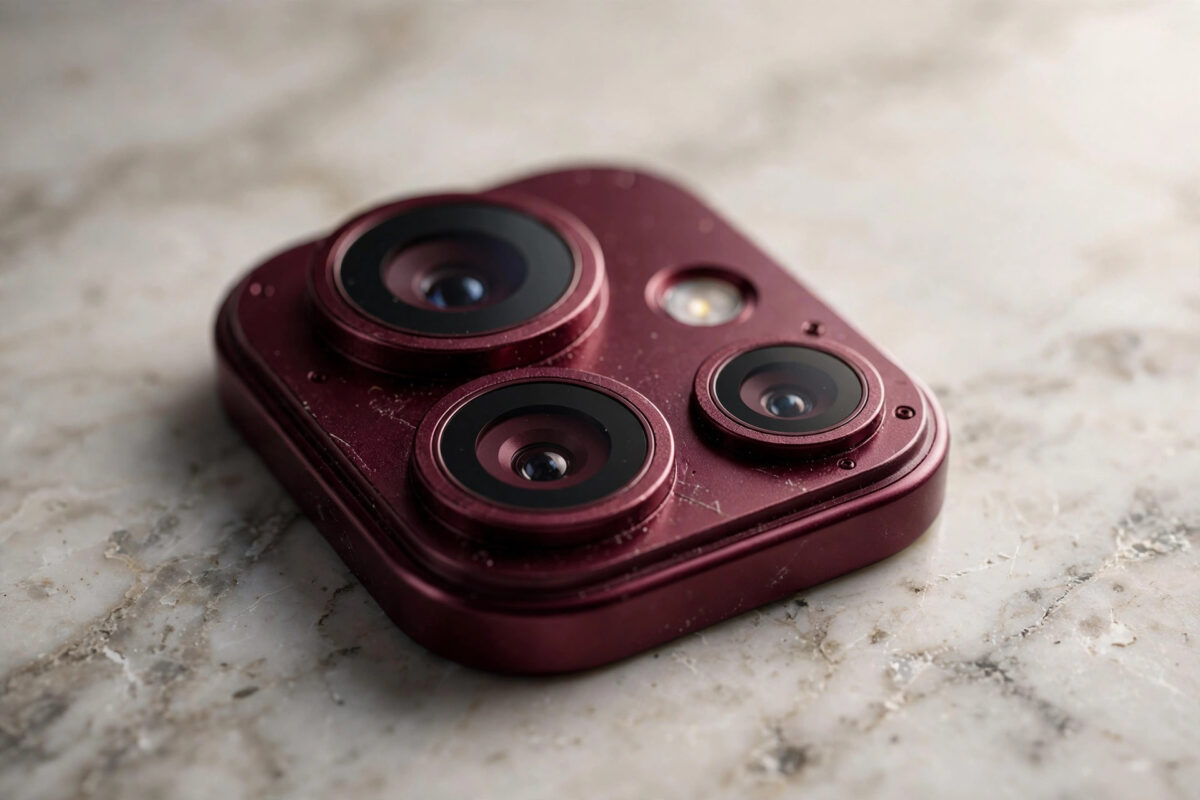
A wave of early iPhone 18 Pro owners — particularly those who chose the Burgundy and darker finishes — have noticed something odd: a faint colour shift or patchiness in the metal around the camera area. It does not affect photos, but on a phone this expensive, any visible blemish feels wrong.
Here is what is likely happening, what you can safely do about it, what you must never do, and how to approach Apple if the marks spread or bother you.
Quick Answer
The discoloration reported around the camera plateau on Burgundy and Black iPhone 18 Pro models appears to be a cosmetic finish issue: the coloured coating on the aluminium frame can change tone slightly with heat, skin oils, friction from cases, or contact with certain chemicals. It does not harm the camera or the phone’s function. Clean the area gently with a soft, slightly damp microfibre cloth only, avoid solvents, alcohol wipes, and polishing, and photograph the marks now so you can show whether they grow. If the discoloration spreads, appears within the first weeks without any chemical contact, or simply bothers you on a new premium phone, contact Apple Support — manufacturing finish defects are a warranty matter, and early, well-documented reports get the best response.
Why Coloured Metal Finishes Can Change Tone
The Pro models use coloured finishes on aluminium, and coloured metal is chemistry as much as it is engineering. Several everyday factors can shift its appearance:
- Heat: the camera area sits over the hardest-working parts of the phone. Repeated warm cycles can subtly alter how a coating looks, especially in strong light.
- Skin oils and sweat: the top edge and camera surround are exactly where fingers grip. Oils left sitting on a finish for weeks can mark it unevenly.
- Case friction: grit trapped between a case and the frame acts like fine sandpaper, wearing the finish in patches that look like discoloration.
- Chemicals: sunscreen, hand sanitiser, perfume, and cleaning sprays are notorious finish-damagers on coloured metal.
- Manufacturing variation: on some units, the coating itself may simply be less durable — which is the scenario the warranty exists for.
None of this means you mishandled the phone. Dark, rich colours like Burgundy show tone differences that silver or natural finishes hide, which is why reports cluster on those models.
What to Do, Step by Step
- Photograph it today. Take clear photos in daylight and under indoor light, close up and at arm’s length. Date-stamped evidence matters if the marks spread.
- Clean it properly once. Power the phone down, remove the case, and wipe the area with a soft microfibre cloth, very slightly dampened with water only. Dry it fully.
- Check whether it is surface grime. Some “discoloration” is actually a film of oils and case residue that lifts with that single careful clean. If it does — problem solved.
- Inspect your case. Look for trapped grit or a rough inner edge near the camera cut-out. Clean the case inside, or change it.
- Watch it for two weeks. If the patch is stable and invisible in normal light, many owners simply live with it. If it grows or darkens, that is your cue to contact Apple.
- Contact Apple with evidence. Use the Support app or website, describe it as a cosmetic finish defect appearing under normal use, and share your dated photos.
What Never to Do
The wrong fix turns a faint mark into permanent damage:
- Never use metal polish, toothpaste, baking soda, or “scratch remover” creams — they strip coloured coatings
- Never scrub with anything abrasive, including the rough side of a sponge
- Avoid alcohol wipes, bleach sprays, and household cleaners on the frame
- Do not apply oils or waxes to “blend” the colour; they change the finish unevenly and can complicate a warranty claim
Apple’s own cleaning guidance, on Apple Support’s iPhone cleaning page, says the same in short form: a soft, lint-free, slightly damp cloth, and no harsh products. If a method is not on that page, keep it away from a Burgundy finish.
Will Apple Replace the Phone for This?
Honestly: it depends on severity and timing, and nobody can promise you an outcome. Apple’s warranty covers defects in materials and workmanship, and a finish that degrades under normal use in the first weeks fits that description far better than damage from a chemical spill does. Owners who report early, bring dated photos, and can show the phone was never exposed to solvents are in the strongest position. Cosmetic wear that appears after months of hard use is usually treated as wear and tear.
If your unit also has other early faults — heat around the same camera area, for instance, as covered in our iPhone 18 Pro overheating guide — mention both together. A pattern of issues on one unit strengthens the case for replacement rather than a brush-off.
Protecting the Finish From Day One
If you are reading this before the marks appear — perhaps because you just bought the Burgundy model — a light routine protects the finish: wipe the frame down with a dry microfibre cloth every few days to remove skin oils before they sit, keep hand sanitiser and sunscreen off your palms before handling the phone where you can, and choose a case with a clean, soft inner lining that you rinse free of grit weekly. None of this is precious or time-consuming; it is the same two minutes of care that keeps any coloured metal — watch cases, jewellery, camera bodies — looking new for years instead of months.
Common Mistakes and Useful Tips
Judging the colour under one light. Burgundy finishes shift dramatically between daylight, office LEDs, and warm home lighting. Check the phone in at least two lights before concluding anything.
Leaving sunscreen on the frame. Wipe the phone down after beach days or workouts. Ten seconds with a dry cloth prevents the most common chemical marking.
Using a gritty case. A case protects nothing if its inner lining holds sand against the frame. Rinse fabric-lined cases regularly and let them dry fully.
Waiting six months to mention it. Finish complaints are time-sensitive. Report early, even if you accept a “monitor it” answer — the report itself is dated evidence.
Conclusion
Camera-area discoloration on the Burgundy iPhone 18 Pro is, for now, a cosmetic finish story rather than a functional fault — but it is a legitimate one on a premium device. Clean the phone gently and correctly, document the marks with dated photos, keep chemicals and gritty cases away from the frame, and take a spreading or early-appearing defect to Apple while your evidence and warranty position are strong.
Frequently Asked Questions
Does the discoloration affect my photos or the camera?
No. The reports concern the metal finish around the camera plateau, not the lenses or sensors. Your photos are unaffected, and the phone’s water resistance and structure are not compromised by a surface colour change.
Is this happening on all iPhone 18 Pro colours?
Reports concentrate on the Burgundy and darker finishes, most likely because rich, dark colours reveal tone differences that pale finishes hide. The same wear may occur on lighter models but is simply harder to see.
Can a case prevent the discoloration?
A clean, well-fitting case with a soft lining protects against friction and chemical contact, but a dirty case with trapped grit causes the exact wear you are trying to avoid. Whichever you choose, clean both the phone and case weekly.
Should I return the phone within the return window instead?
If you are still inside the retailer’s return period and the marks genuinely bother you, exchanging the unit is the simplest route of all. Take your dated photos with you; a visible defect on a days-old phone is normally exchanged without argument.
Will the discoloration get worse over time?
If the cause is environmental — oils, chemicals, friction — it can progress unless you change the exposure. If it is a coating weakness, it may also spread. Either way, photographing it monthly gives you an objective record instead of guesswork.



[…] so plainly at the appointment; combined symptoms point technicians to the right module faster. Our guide to iPhone 18 Pro camera-area finish issues explains how to document cosmetic or physical changes with dated photos, and the same evidence […]