
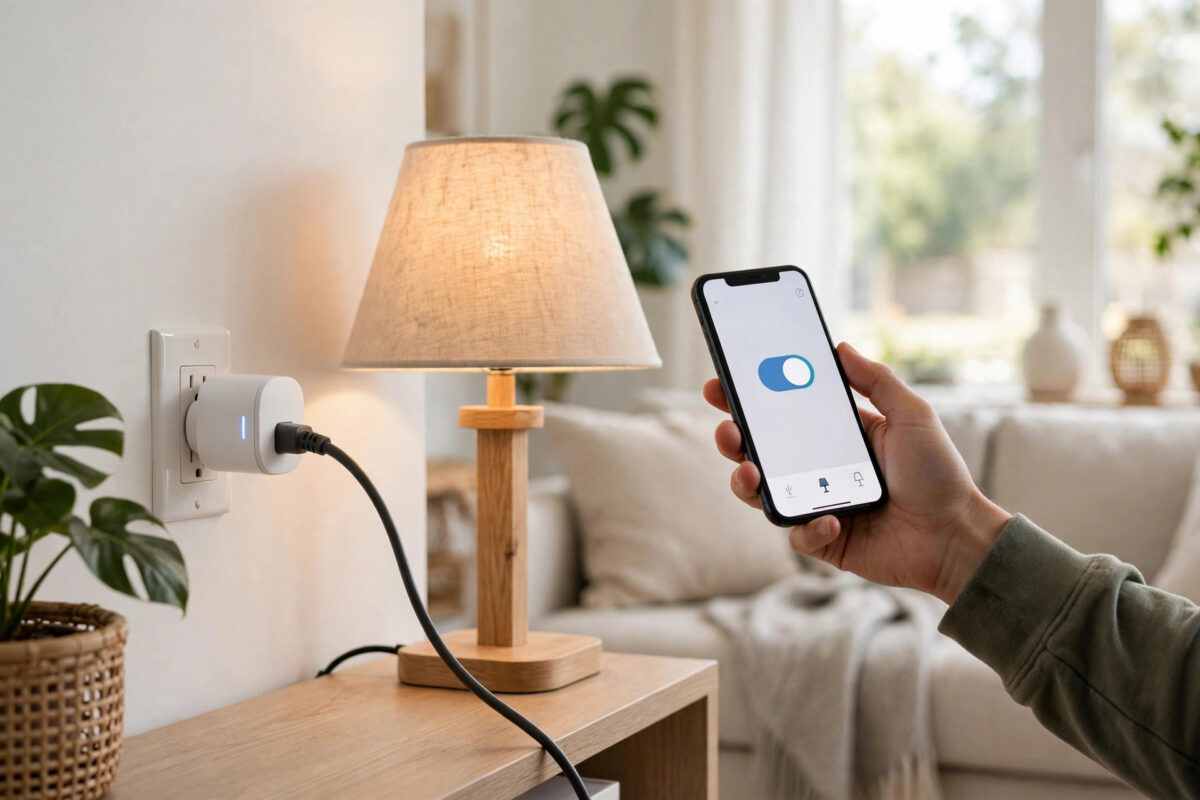
A smart plug is the smallest, cheapest step into home automation: anything that plugs into it — a lamp, a fan, a coffee machine, an iron — can be switched from your phone, put on a schedule, or controlled by voice. Setup takes about five minutes, but the difference between a gimmick and a genuinely useful automation is in the details: choosing the right plug for the load, naming things properly, and building schedules that match how you actually live. This guide covers all of it.
Quick Answer
Download the plug maker’s app, plug the smart plug into a wall socket, hold its button until the light blinks, and add it in the app connected to your 2.4GHz Wi-Fi. Plug your appliance in, name it by what it controls (“Coffee Machine”), and set schedules or countdown timers in the app. Link the app to Alexa, Google Home, or Apple Home if you want voice control.
Choosing the Right Plug
- Check the rating: UK smart plugs are typically rated 13A / 2990W, but cheaper models may be 10A. Heaters, kettles, and irons draw heavily — match the plug’s rating to the appliance and never run a high-draw heater on an underrated plug.
- Energy monitoring: Plugs from Tapo (P110), Meross, and others measure power use. Worth the small premium: they tell you what the tumble dryer actually costs and can alert you when a cycle finishes (power drops to zero).
- Form factor: Bulky plugs block the neighbouring socket on a double outlet. Slim designs (Tapo P100/P110, Amazon Smart Plug) sit side by side happily.
- Ecosystem: Wi-Fi plugs need no hub. Matter-over-Wi-Fi and Thread plugs work with Apple Home, Google Home, and Alexa interchangeably — the Matter standard explained on Wikipedia shows why these are the future-proof choice.
- Outdoor use: Garden lights and pond pumps need a weatherproof (IP44+) outdoor plug — indoor plugs must never live outside.
Step-by-Step Setup
- Install the app for your brand (Tapo, Smart Life, Meross, Govee, or the Amazon/Google app for their own plugs) and create an account.
- Plug the smart plug into a wall socket — use a wall socket, not an extension lead, for first setup and for any heavy appliance permanently.
- Put it in pairing mode: Most plugs blink automatically the first time; otherwise hold the side button for about five seconds until the LED flashes.
- Tap Add Device in the app, pick the plug model, and connect it to your 2.4GHz Wi-Fi with your password. Plugs are 2.4GHz-only almost without exception.
- Name it after the appliance, not the plug: “Washing Machine”, “Desk Fan”, “Hall Lamp”. The name is what you will say to your voice assistant.
- Plug the appliance in and test on/off from the app. For lamps and chargers you are done; for machines with their own electronic controls, read the next section.
- Update the firmware when the app prompts — plug firmware updates fix the most common Wi-Fi dropouts.
The Appliance Caveat: What a Smart Plug Can and Cannot Do
A smart plug controls power, nothing more. Whether the appliance responds usefully depends on the appliance:
- Works perfectly: Anything with a mechanical switch or a “resume after power cut” behaviour — lamps with the switch left on, fans, older coffee machines with a physical switch, slow cookers, heated blankets with dial controls, Christmas lights.
- Does not work as hoped: Appliances with touch controls or electronic start buttons — most modern washing machines, microwaves, and espresso machines — because restoring power leaves them sitting in standby waiting for a button press. Test yours: run it, pull the plug mid-cycle (briefly), restore power, and see whether it resumes.
- Voice and routine tip: For lamps on plugs, combine with the lighting system later if you want dimming; our guide on controlling home lights from your phone explains when a smart bulb beats a plug.
Automations Worth Setting Up
Schedules
The classics: coffee machine warmed up at 6:45am on weekdays, lamp on at sunset and off at 11pm, fan off an hour after you fall asleep. Use the app’s sunrise/sunset option for anything light-related so it self-adjusts through the year.
Countdown Timers
Perfect for irons, straighteners, soldering irons, and chargers: “on now, off in 30 minutes” removes the “did I leave it on?” anxiety permanently. Many people pair this with a plug on the iron and never think about it again.
Away Mode
Most apps can randomise on/off times within a window while you are on holiday, making a lamp look lived-in rather than timer-obvious.
Energy-Based Automations
On monitoring plugs, some apps can notify you when power draw starts or stops — a washing-machine-finished alert for the price of a plug, without buying a smart washing machine. If the plug also feeds a room with a voice assistant, linking accounts takes a minute — see our smart speaker setup guide for the Alexa and Google Home linking steps.
Safety Rules
- Never put a smart plug between the wall and an appliance that must never be interrupted (medical devices, fridges and freezers you rely on — a glitch or accidental tap should not thaw your food; if you use one for monitoring only, disable remote off where the app allows).
- Do not plug extension leads full of heavy appliances into one smart plug; the total load still counts against its rating.
- Keep plugs out of bathrooms and away from water unless rated for it.
- Remember a plug can be switched remotely from anywhere — think twice before putting anything with a heating element on a plug controlled by children or shared accounts.
Common Mistakes to Avoid
- Naming the plug instead of the appliance: “Smart Plug 3” is useless for voice control and for future you. Name the load.
- Buying Wi-Fi plugs for a weak-signal corner: A plug in a garage on the edge of coverage drops offline and misses schedules. Check signal first or choose a mesh-friendly ecosystem.
- Assuming every appliance resumes: Test the power-cut behaviour before building a morning routine around a coffee machine that will sit in standby.
- Forgetting plugs still draw a little power: Roughly half a watt each in standby — negligible individually, worth knowing if you deploy twenty.
Conclusion
A smart plug set up well disappears into daily life: the coffee machine is hot when you wake, the iron can never be left on, the lamp follows the sunset. Choose a plug rated for the job, name it after the appliance, test how that appliance behaves when power returns, and build one or two schedules that match your real routine — that is automation that earns its place.
Frequently Asked Questions
Do smart plugs work without the internet?
Schedules already saved to the plug usually keep running during an outage, but app and voice control need the internet (voice assistants are cloud services). Local control returns when the connection does.
Can a smart plug turn my TV on?
It can restore power, but most modern TVs return to standby rather than switching on. A better route for TVs is an infrared blaster or the TV’s own timers. The plug is still useful for cutting a TV’s standby draw overnight on a schedule.
How many smart plugs can I have?
Practically, dozens. Each Wi-Fi plug is one device on your router; homes with very large counts (50+) of Wi-Fi gadgets should consider a mesh system or Thread/Matter devices to keep the network healthy.
Will a smart plug save me money?
It can: schedules stop forgotten devices running, and energy-monitoring plugs reveal the appliances quietly costing you the most, which often changes habits more than the plug itself saves.
Can I use a smart plug with a heater?
Only if the plug’s rating comfortably exceeds the heater’s draw (a 2kW heater needs a proper 13A plug, not a 10A import), and never leave any portable heater running unattended as a matter of general safety, smart plug or not.

Leave a Reply