
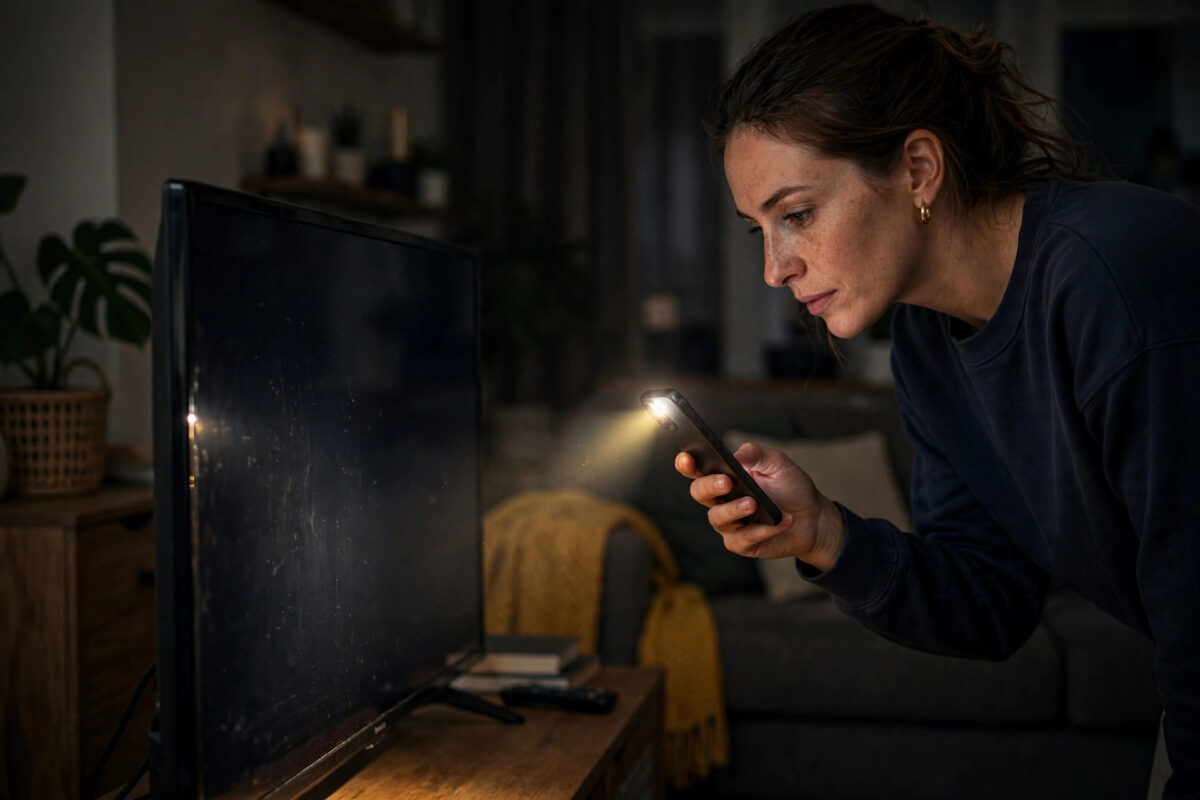
A TV that plays sound but shows a black screen is not necessarily a dead TV. In fact, this exact fault has several cheap causes — a loose cable, a confused source, a backlight setting — and only one expensive one: a failed backlight or panel. The trick is to work through the simple checks in the right order before you start pricing repairs. This guide shows you how to diagnose the problem at home with nothing more than your remote and a torch.
Quick Answer
First check the TV is on the correct input and that the source device is awake. Then shine a torch at the screen from a few centimetres away: if you can faintly see the picture, the backlight has failed or been turned down. If the screen is completely black with no faint image, try a power reset (unplug for 60 seconds), test a different HDMI cable and port, and turn off energy-saving and ambient-light settings that may be dimming the display to black.
Step 1: Rule Out the Source
- Press the Menu or Home button on the TV remote. If the TV’s own menu appears clearly, the panel and backlight are fine — the problem is the source or the input. If nothing appears at all, the fault is inside the TV; skip to Step 3.
- Check the input: Press Source/Input and cycle to the correct HDMI port. A cable box that was moved from HDMI 1 to HDMI 2 during cleaning is a classic cause.
- Wake the source device: Many cable boxes, streaming sticks, and consoles sleep and output a black screen while still passing audio from a previous channel. Restart the source box completely.
- Try a different source: Open a built-in app like YouTube or Netflix from the TV’s home screen. If apps show a picture but HDMI devices do not, you have a cable or port problem, not a TV problem.
Step 2: The Torch Test (Backlight Diagnosis)
Turn the TV on, play something with sound, darken the room, and hold a phone torch a few centimetres from the screen, angled slightly. Look carefully:
- You can faintly see the picture — menus, faces, movement — under the torchlight. This means the LCD panel is producing an image but the LED backlight behind it is off or failed. First check the settings below (Step 4), because a backlight level set to zero or an aggressive eco mode can mimic this. If settings are fine, it is a hardware backlight fault.
- You see nothing at all, not even a faint image — the panel is receiving no picture. That points to the power reset and cable checks in Step 3, or an internal board fault.
- Half the screen is darker than the other half — one backlight strip has failed. This is a repair-shop job on most models.
On OLED TVs there is no backlight — each pixel lights itself — so a black screen with sound on an OLED means a panel or board fault, not a torch-test case. The explanation of LED-backlit LCD displays on Wikipedia shows how the backlight layer sits behind the panel if you want to understand what has failed.
Step 3: Power Reset and Cable Checks
- Full power reset: Turn the TV off, unplug it from the wall, and hold the TV’s physical power button for 15 seconds to drain residual charge. Wait a full 60 seconds, plug back in, and switch on. This clears temporary faults in the main board that a normal standby restart does not.
- Swap the HDMI cable: A damaged cable can carry audio and fail on video. Test with a known-good cable, and try a different HDMI port on the TV.
- Disconnect everything: Remove all HDMI devices, USB sticks, and the aerial, then power on. If the TV’s menu and a “no signal” message appear, reconnect devices one at a time until the black screen returns — that device or its cable is the culprit.
- Check the brightness setting blind: If someone (often a child) has set brightness and backlight to minimum, the screen can look dead in daylight. Press Menu and raise the picture settings using the on-screen menu positions from the manual, or reset picture settings from the settings menu.
Step 4: Settings That Can Black Out the Screen
- Eco / energy saving modes: Settings > General > Eco Solution (Samsung) or Energy Saving (LG) can dim the backlight aggressively in a dark room. Set to Off and retest.
- Ambient light sensor: “Brightness Optimisation” or “AI Brightness” can misread a dark room and dim the screen to near-black. Disable it temporarily.
- Screen-off / audio-only mode: Many TVs have a “Screen Off” feature (used for listening to music channels) that a stray remote press can enable. Pressing any picture-related button or the power button restores it — check your manual for the exact key.
- Picture reset: Settings > Picture > Reset Picture restores defaults without touching your apps or channels — a safe way to undo mystery settings.
If you have only just wall-mounted or set the TV up, also confirm the basics in our smart TV first-time setup guide, particularly the input and picture-mode steps.
When It Is a Hardware Repair
If the torch test shows a faint image and every setting is correct, the LED backlight strips or their power board have failed. Backlight strip replacement is one of the most common TV repairs and is usually economical on TVs under five years old, though it involves opening the panel and is not a beginner DIY job. A completely black screen with no faint image, especially with a clicking sound or a standby light that blinks in a pattern, points to the power supply or main board — count the blinks, as manufacturers use them as error codes that a repairer (or the brand’s support line) can decode. Always check your warranty and any retailer guarantee first; backlight faults within warranty are a free repair or replacement.
Common Mistakes to Avoid
- Assuming the TV is dead and buying a new one immediately: A large share of “sound but no picture” cases are inputs, cables, and eco settings.
- Skipping the torch test: It takes thirty seconds and tells you which half of the TV is at fault.
- Using standby instead of unplugging for the reset: Standby keeps the boards powered. The plug must come out for a full minute.
- Opening the TV yourself while it is in warranty: You will void the warranty, and the power supply holds a charge even when unplugged.
Conclusion
Work in order: menu test, input and source checks, torch test, power reset, cables, then picture and eco settings. That sequence separates the free fixes from the genuine hardware faults in about ten minutes. If the torch reveals a faint picture with correct settings, you are looking at a backlight repair — get a quote before deciding whether the TV is worth saving.
Frequently Asked Questions
Why does my TV have sound but a black screen on Netflix only?
If the menus and other apps look fine, the app or its copy protection handshake is failing. Restart the TV fully (unplug for 60 seconds), update the app, and swap the HDMI cable if you use an external streaming box — an old cable that lacks current HDCP support causes exactly this symptom.
What does it mean if I can see a faint picture with a torch?
The panel works but the backlight is off or has failed. Check backlight level and eco settings first; if they are normal, the LED strips or their driver board need repair.
How much does a backlight repair usually cost?
It varies by size and brand, but strip replacement by an independent repairer is commonly far cheaper than a new TV of the same size. Get two quotes, and weigh them against the TV’s age — on a TV over seven years old, replacement often makes more sense.
The screen went black but came back after unplugging. Will it happen again?
Possibly — a one-off glitch in the main board is common and harmless, but if it recurs weekly, install any pending software update and note whether it correlates with one input or device. Recurring faults that worsen are worth a warranty claim while it is still covered.
My TV screen is black but the standby light is on. Is it the power supply?
Not necessarily. Try the full power reset first. If the TV clicks repeatedly or the standby light blinks in a repeating pattern, that is often a power supply or main board fault that a technician can identify from the blink code in the service manual.


Leave a Reply