
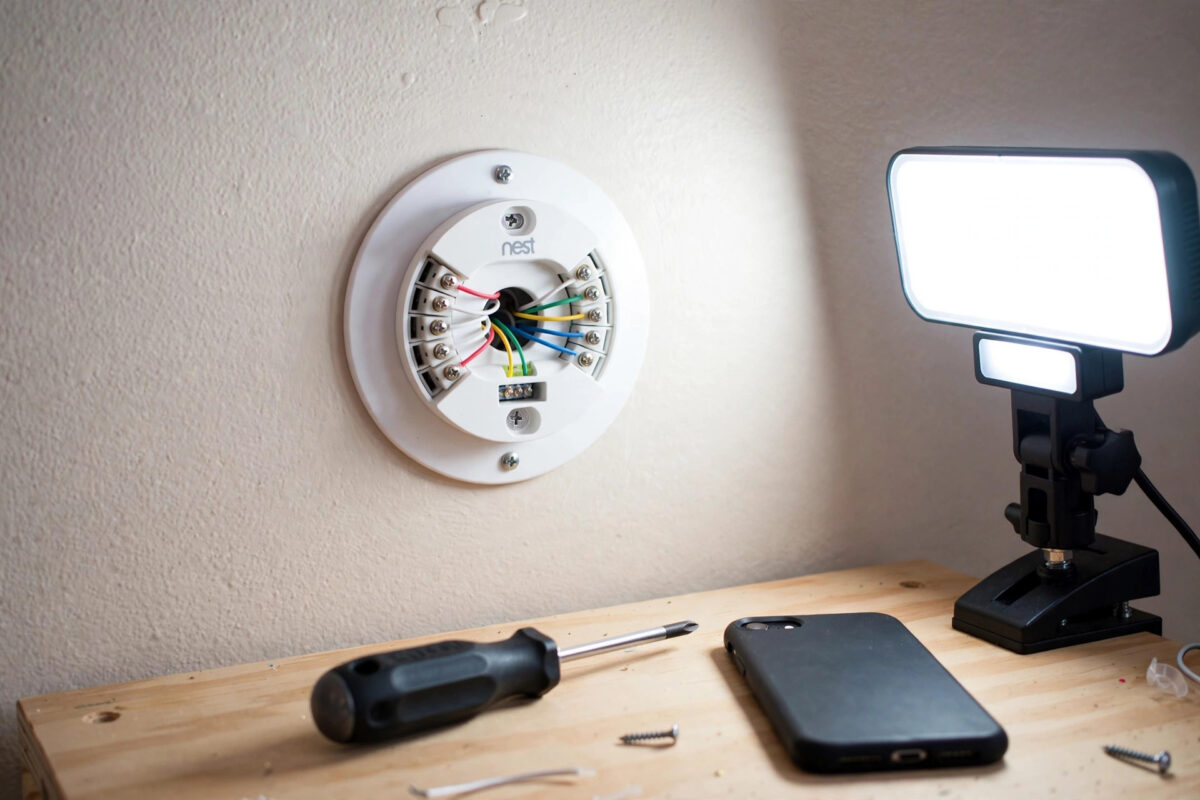
You have set up, or are trying to set up, a Nest thermostat, and it keeps showing error N260 or a message saying it needs a C wire. The thermostat may work for a while and then complain, lose Wi-Fi, or show a power message just when the heating runs for a long time. It feels like the thermostat wants a wire your house simply does not have.
The good news is that N260 does not always mean expensive rewiring. It means the thermostat is not getting steady enough power. Several proper fixes exist, from using a spare wire already in your wall to fitting a power connector or having a professional run a new cable.
Safety note: Always turn off power to your heating and cooling system at the breaker, and at the equipment switch if there is one, before you remove the thermostat, touch any wire, or open any equipment panel. If you are not confident identifying wires, or your system wiring looks damaged or unusual, stop and hire a qualified heating professional.
Quick Answer
Error N260 means your Nest thermostat needs a common wire, called a C wire, or another steady power solution because it cannot charge reliably from the heating wires alone. The best fix is to connect an unused spare wire in the thermostat cable as C at both the thermostat and the furnace control board. If there is no spare wire, a Nest Power Connector fitted at the equipment, or a new C wire run by a professional, are the proper alternatives.
What a C Wire Is and Why Nest Thermostats Want One
Think of your thermostat wiring as a small electrical circuit. The R wire brings 24-volt power to the thermostat. For that power to do useful work and return, the circuit needs a return path. The C wire, short for common, provides that steady return path, so the thermostat can power its screen, sensors, and Wi-Fi radio all day without stealing power from elsewhere.
Older thermostats ran on batteries, so many homes were wired without a C wire. Smart thermostats tried sipping tiny amounts of power through the heating wires when the system was off, called power stealing. That works on some systems and fails on others. When heating runs for hours, the battery can drain, and the thermostat reports N260, delays heating to charge, or drops off Wi-Fi.
Signs Your Real Problem Is Power, Not Wi-Fi
- The thermostat shows N260, N261, or other N2 power messages during or after setup.
- The screen says the thermostat will delay heating or cooling while it charges.
- Wi-Fi drops out even though other devices near the thermostat work fine.
- The display is slow to wake, or the battery reading in technical info keeps falling.
- Problems are worse in very cold or very hot weather, when the system runs for long stretches.
Option 1: Use a Spare Wire Already in the Wall
Before buying anything, check what is already there. Many cables contain five or more wires, and older systems used only three or four. An unused wire may be tucked behind the thermostat.
Remember: Turn off power at the breaker before starting. Take photos at every stage.
- Switch off power at the breaker and the equipment switch, then gently remove the thermostat display from its base.
- Photograph the current wiring and look for an unused wire behind the base plate or inside the wall opening.
- If you find a spare wire, remember its colour. You now need to connect that same wire to the C terminal at the heating equipment control board.
- At the furnace, air handler, or boiler control board, with power still off, find the terminal strip and locate the C or Com terminal. Connect the spare wire there firmly, following the equipment manual if you have it.
- Back at the thermostat, strip a short clean end if needed, and push the spare wire fully into the C connector on the Nest base.
- Refit the thermostat, restore power, and run setup or the equipment test. Check Settings for power messages and confirm the N260 error is gone.
If opening the equipment panel feels beyond you, a heating technician does this job quickly and can test voltages while there. The spare-wire fix is still the cheapest route, because the parts cost nothing.
Option 2: Fit a Nest Power Connector
If there is no spare wire, Google sells a small device called the Nest Power Connector. It is fitted at the heating equipment, not at the thermostat, and it lets the thermostat draw steady power through the existing wires. It was designed exactly for homes that show N260 and similar power errors but have no C wire.
The connector is wired in at the control board, following a diagram for your system type, with power off at the breaker. Many confident homeowners fit one in under an hour. Others prefer a professional, especially where the board is inside a sealed boiler or labels are unclear.
Full wiring diagrams for different system types are available on the official Google Nest support pages for the Power Connector, and it is worth reading the diagram for your exact setup twice before touching a single wire.
What the Power Connector Is Not
It is not a plug-in wall adapter in the room. Those leave visible cables and can be wrong for some systems. The Power Connector is hidden at the equipment and is the solution Google designed for this error, so prefer it where possible.
Option 3: Run a New C Wire
The most permanent fix is a new thermostat cable run from the equipment to the thermostat. It suits renovations, damaged cables, and older systems other options cannot help, but it may involve drilling or lifting floorboards. Ask the installer for at least five wires, ideally more, because cable is cheap compared with labour.
Temporary Workarounds and Their Limits
Some guides suggest moving the G fan wire to C. That can work in a few systems, but you lose independent fan control. Treat it as a technician-advised option only.
Charging the thermostat with USB, on models that allow it, can get you through setup, but it is not a long-term fix because the battery will drain again in daily use.
While sorting power, keep the rest of the setup clean as well. A thermostat that finally has stable power deserves a tidy smart home around it, and our guide to setting up a smart speaker correctly from the start helps you add voice control for your heating without account or network confusion.
How to Confirm the Fix Worked
- With the thermostat refitted and power restored, wait fifteen minutes and open Settings, then Technical Info, then Power on the device.
- Check that no N260 or power message is showing, and note the battery voltage. It should be stable or rising, not falling hour by hour.
- Run an equipment test from the app or device: heating on, heating off, and fan or cooling if you have them.
- Leave Wi-Fi connected overnight and check the app the next morning. Stable power usually ends the random offline pattern too.
- Recheck after the first long heating run in cold weather, because that is when weak power setups fail.
Common Mistakes to Avoid
- Working with power on: Always switch off at the breaker first. A short during wiring changes can blow the control board fuse.
- Connecting C at only one end: A C wire must be connected at the thermostat and at the equipment board. One end alone does nothing.
- Guessing by wire colour: Colours vary between homes. What matters is which terminal each wire is on at both ends, confirmed with photos.
- Ignoring a blown fuse: If the system is dead after wiring work, do not keep swapping wires. Switch off and check for a blown low-voltage fuse, or call a professional.
- Buying random adapters first: Check for a spare wire before spending money. Many homes already have the fix hidden in the wall.
Conclusion
Error N260 is your Nest thermostat asking for steady power it cannot get from the existing wires alone. The cleanest fix is a spare wire connected as C at both ends. Where no spare exists, a Nest Power Connector at the equipment is the designed solution, and a newly run cable is the permanent option during bigger work. Work with the power off, photograph everything, and do not be shy about using a heating professional for the equipment end. Once power is stable, the thermostat stops nagging, Wi-Fi settles down, and heating behaves the way you expected when you bought it.
Frequently Asked Questions
Is N260 harmful to my heating system?
N260 itself is a power warning, not damage. The risk comes from poor workarounds, such as miswiring or bypassing safety controls. A proper C wire or Power Connector, fitted with power off, is the safe route.
Can I use my thermostat without a C wire at all?
Some systems run for a while without one, especially with short heating cycles. The problem is reliability: battery drain, Wi-Fi drops, and delayed heating tend to appear over time. If your thermostat asks for a C wire, plan a proper power fix.
How much does a professional C wire fix usually involve?
If a spare wire already exists, it is often a short visit to connect both ends and test the system. Running a new cable costs more because of labour and access. Fitting a Power Connector sits between the two in effort.
Why does N260 appear months after installation?
Power stealing can cope in mild weather and fail when the system runs non-stop in a cold snap or heatwave, draining the battery faster than it can charge. Seasonal failure is a classic sign that the thermostat needs a real C wire solution.
Will a C wire fix my thermostat going offline in the app?
Often, yes. Low power shuts down Wi-Fi before it affects heating control, so fixing power removes many offline reports. If the app still shows offline with healthy power readings, work through router and account checks separately.



Leave a Reply