
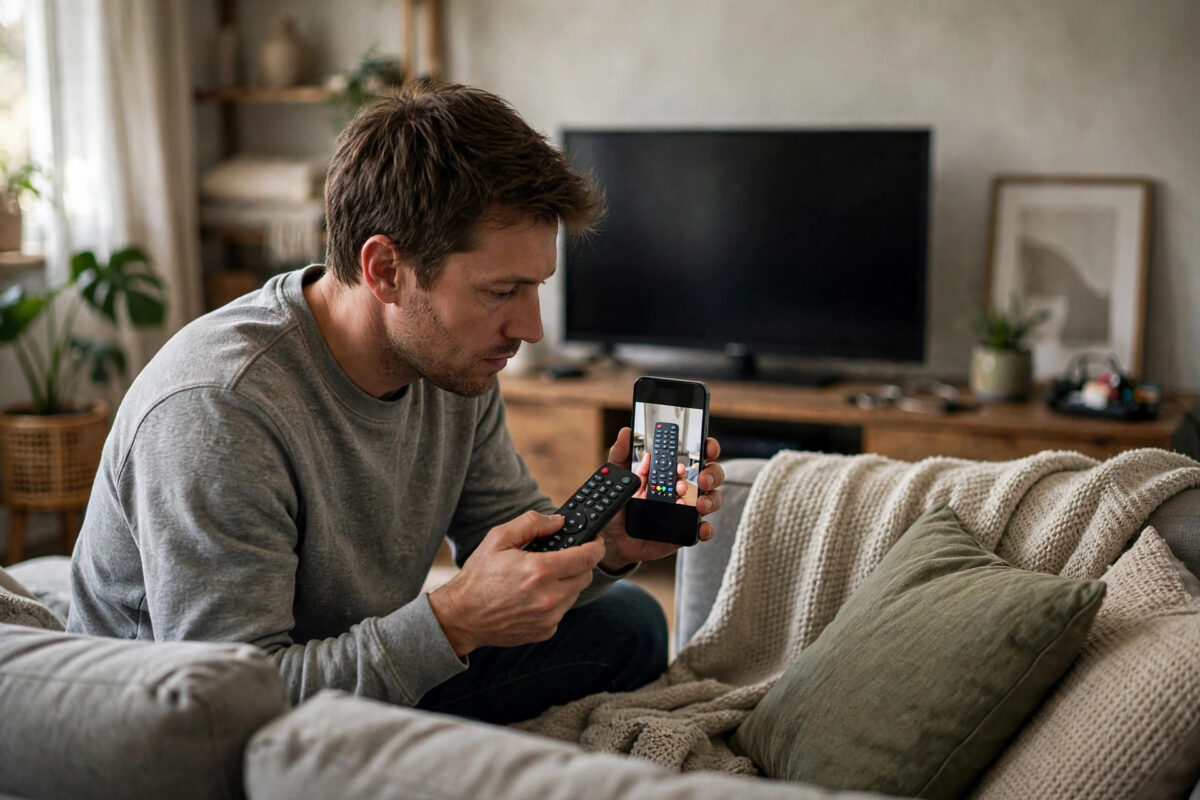
A remote control that suddenly stops working is usually not broken — it is suffering from one of a handful of fixable problems: tired batteries putting out too little voltage, a blocked or dirty infrared window, a Bluetooth pairing that silently dropped, or a TV that needs a reset more than the remote does. Before spending money on a replacement, spend ten minutes on the checks in this guide. They are ordered from the most common cause to the least.
Quick Answer
Replace the batteries with fresh ones (even if the old ones “work in something else”), clean the remote’s front window and the TV’s sensor, and point it directly at the TV from close range. If it is a Bluetooth smart remote, re-pair it (usually by holding Return + Play/Pause, or Back + Home, near the TV). If nothing responds, reset the TV at the wall socket for 60 seconds and test again.
Step 1: Diagnose — Is It the Remote or the TV?
- The phone camera test (infrared remotes): Open your phone’s camera, point the remote’s front end at the lens, and press buttons. A working IR remote shows a flashing purple-white light on the phone screen that your eyes cannot see. Flashing = the remote is sending; the problem is at the TV end. No flash = the remote is not transmitting (batteries, damage, or it is a Bluetooth remote, which shows nothing on camera — skip to Step 4).
- The TV’s own buttons: Use the physical power/channel buttons on the TV (usually underneath or on the back edge) to confirm the TV itself responds. If the TV ignores its own buttons too, the fault is the TV, not the remote — unplug it for 60 seconds and retry.
- Another remote or app: Most smart TVs have a free phone remote app (Samsung SmartThings, LG ThinQ, Google TV app, Sony TV Remote). If the app controls the TV perfectly, the TV is fine and the physical remote is guilty.
Step 2: Batteries — Done Properly
- Fit a brand-new pair from a sealed pack. Remotes need full voltage; batteries that still run a clock or a toy may be too weak for an IR LED or Bluetooth radio.
- Use two of the same type and brand, both fresh. Mixing an old and new cell is a classic false fix.
- Clean the battery contacts with a dry cloth or a pencil eraser if you see any white or green corrosion, and check the springs still press firmly.
- For rechargeable smart remotes (Samsung SolarCell, some LG and Sony models), charge fully via USB-C or leave the solar cell under a lamp — a flat smart remote behaves exactly like a dead one, and its low-battery warnings are easy to miss.
Step 3: Signal Path Problems (Infrared Remotes)
- Line of sight: IR needs a clear path to the sensor, usually at the bottom centre or corner of the TV frame. Soundbars, ornaments, and even a row of festive cards on the TV stand can block it. Test from two metres away, dead centre.
- Clean both windows: Wipe the remote’s dark plastic tip and the TV’s sensor area with a soft dry cloth. Sticky residue from years of thumbs dulls both.
- Interference: Strong sunlight on the sensor, some LED and fluorescent lights, and plasma screens can flood the sensor with infrared noise. Test in the evening or shade the sensor briefly to confirm.
- Distance and angle: Weak batteries shrink range before they stop it entirely. If the remote works at one metre but not from the sofa, that is batteries, again — see Step 2.
Step 4: Re-Pair a Bluetooth Smart Remote
Voice remotes and pointer remotes use Bluetooth, and their pairing silently breaks after TV updates, flat batteries, or interference:
- Samsung: Point the remote at the TV from within 30cm and hold Return + Play/Pause together for 3–5 seconds until the pairing message appears.
- LG Magic Remote: Press the Home button, or hold Home + Back for 5 seconds to deregister, then press the wheel (OK) to pair again. If the pointer vanishes, shake the remote or press a direction key to wake it.
- Google TV / Android TV: Settings > Remotes & Accessories > Pair accessory, while holding the remote’s Home + Back buttons (varies by model) until it appears in the list.
- Fire TV: Hold the remote’s Home button for 10 seconds near the TV; for a full reset of the remote itself, Amazon publishes button sequences per model on its Fire TV help pages.
While you are in the TV’s settings, install any pending software update — remote and Bluetooth bugs are a frequent silent fix in updates, as covered in our smart TV software update guide.
Step 5: Reset and Interference Fixes
- Unplug the TV for a full 60 seconds (this resets its Bluetooth and IR handling), then test again.
- Move USB 3.0 hard drives and their cables away from the TV’s sensor and Bluetooth area — poorly shielded USB 3 devices are a documented source of 2.4GHz interference that can kill Bluetooth remotes.
- Remove other remotes from the room temporarily; a stuck button on a second remote (or a cushion pressing one in another room) can jam the TV with constant signals.
- As a last resort, factory-reset the remote if the manufacturer provides a combination (for example, some Samsung and Sony remotes), then pair it fresh.
When the Remote Really Is Dead
Signs of true hardware death: no IR flash on camera with known-good batteries, visible liquid damage or heavy corrosion inside, a cracked board after a drop, or one half of the buttons dead while the rest work (worn conductive pads). Replacements, in order of preference:
- Genuine manufacturer remote by exact model number — costs more, works perfectly including voice.
- Phone remote app — free and instant, fine as a stopgap, less lovely at 1am.
- Universal remote — good for basic control of TV plus boxes; voice and pointer features usually do not carry over.
- The same ecosystem trick from our cleaning and care guide: while the replacement ships, keep the old one safe — if you also plan a screen clean, our guide to cleaning a flat-screen TV safely includes the safe way to clean a remote properly too.
Common Mistakes to Avoid
- Testing “good” batteries from a drawer: Drawer batteries are why this step fails. New sealed pack, every time.
- Judging an IR remote by looking for a visible light: Infrared is invisible to eyes; only the phone-camera test tells the truth (note: some front iPhone cameras filter IR — use the rear camera).
- Re-pairing from across the room: Bluetooth pairing for remotes often needs the remote within a metre of the TV.
- Buying a replacement before the TV reset: A surprising number of “dead remotes” are a confused TV, cured by 60 seconds unplugged.
Conclusion
Work the order: camera test to find the guilty end, fresh batteries, clean windows and clear line of sight, re-pair if it is a smart remote, then reset the TV. Nine times out of ten the remote recovers without spending anything. And when it truly is dead, you will know exactly why — which makes choosing the replacement a confident purchase instead of a guess.
Frequently Asked Questions
Why does my remote only work when I am close to the TV?
Fading range is the signature of weak batteries: the IR LED still fires but too dimly, or the Bluetooth radio reduces power. Fit new batteries before suspecting anything else.
Some buttons work and others do not. What is wrong?
Usually worn or dirty contacts under those specific buttons — the high-use ones (volume, power) go first. Sometimes a careful opening and cleaning of the rubber membrane and board with a dry cloth revives it; if the conductive pads are worn away, replacement is the fix.
My TV responds slowly to the remote. How do I fix it?
For smart TVs, lag often comes from the TV’s processor being busy or a pending update — restart the TV fully. For IR remotes, check for interference from bright lights, and replace the batteries; a weak signal causes missed and repeated commands that feel like lag.
Can I use my phone as a permanent remote?
You can, and many people do, but a physical remote is faster for volume and power and works for guests and children. Treat the app as a bridge while a replacement arrives, or keep both: app for typing passwords (much faster), remote for everyday use.
The remote works but the voice button does nothing. Why?
Voice needs the Bluetooth pairing and the TV’s internet connection, plus a signed-in account on some brands. Re-pair the remote, confirm the TV is online, and check the microphone privacy switch if your remote has one.
Leave a Reply