
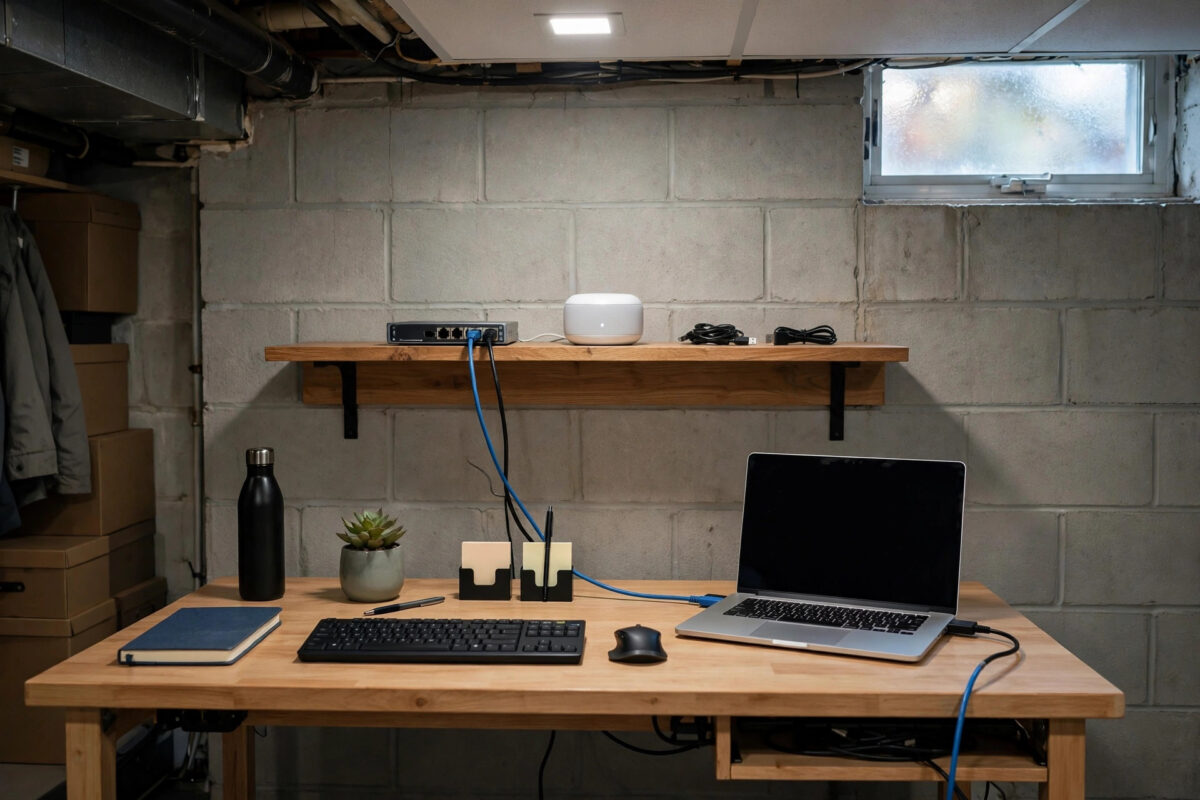
A basement office is quiet, private, and cool — and famously terrible for internet speed. The router is usually two floors up, the signal has to pass through concrete, floor joists, and metal ducting, and by the time it reaches your desk it is a fraction of what the rest of the house enjoys.
The good news is that a basement is one of the easiest weak spots to fix properly, because you do not need to make Wi-Fi heroic. You need to get a wired or near-wired connection down there once, and the problem is solved for years.
This guide ranks the solutions from best to simplest, with the real speeds you can expect from each, what they cost, and the setup mistakes that leave people disappointed even after spending money.
Quick Answer
The best way to improve internet speed in a basement office is to run a Cat6 Ethernet cable from your router to the basement for a full gigabit wired connection. If cabling is impossible, use a mesh Wi-Fi node wired or wirelessly backhauled in the basement, or MoCA adapters over existing coax cable for near-gigabit speeds.
Why Basements Kill Wi-Fi Speed
Before choosing a fix, it helps to know exactly what you are fighting. Basement speed problems are physics, not bad luck.
What Blocks the Signal
Wi-Fi, especially the fast 5 GHz and 6 GHz bands, weakens sharply through dense material. A single concrete floor can cut signal strength by 10 to 20 dB, which can reduce a 500 Mbps connection upstairs to 20 to 60 Mbps in the basement. Metal heating ducts, foil-backed insulation, and reinforced concrete are even worse.
The slower 2.4 GHz band travels through obstacles better, which is why your basement devices often cling to 2.4 GHz — but that band tops out at 50 to 100 Mbps in real conditions and is crowded with interference. You can read more about how frequency affects range in the Wi-Fi standards and frequency bands overview on Wikipedia.
How to Measure Your Basement Problem
Run a speed test at your desk and then the same test standing next to the router. If the router-side result is 400 Mbps and the basement result is 35 Mbps, your broadband is fine and your in-home coverage is the whole problem.
Also check signal strength: -75 dBm or weaker at your desk confirms a coverage fault, while better than -60 dBm should support fast speeds.
The Best Fix: Run an Ethernet Cable
A wired connection ignores walls, floors, and interference entirely. It gives you the full speed of your broadband plan, the lowest possible ping, and zero variation between morning and evening.
What Cable and Speed to Expect
Use Cat6 cable, which supports 1 Gbps up to 100 metres and even 10 Gbps over shorter home runs. Cat5e also handles gigabit and is fine if you already have it, but Cat6 costs barely more and is the better long-term choice. Avoid flat novelty cables for a permanent run.
With a gigabit plan and a Cat6 run, expect a steady 900 to 940 Mbps wired at your basement desk, with ping of 5 to 15ms — identical to sitting next to the router. Add a small gigabit switch in the basement, costing around £15 to £25, and you can wire your computer, printer, and a Wi-Fi access point from that single run.
How to Route the Cable Downstairs
Most homes have an easier path than people expect:
- Follow existing routes: alongside plumbing pipes, inside a laundry chute void, or down the stairwell wall cavity.
- Drill a small 10mm hole through the floor inside a cupboard or behind furniture on each level if no void exists.
- Run the Cat6 cable loosely with gentle bends — never staple it tightly or bend it sharply around corners.
- Fit wall sockets at both ends for a neat finish, or use pre-terminated cable with surface trunking if you rent.
- Test the run with your laptop before tidying cables, confirming you see a 1 Gbps link speed in network settings.
In a rented home, adhesive trunking along skirting boards achieves the same result without damage.
Strong Alternatives When You Cannot Run Cable
Not every home allows a cable run. These options, in ranking order, get you most of the way there.
MoCA Adapters Over Existing Coax
If your house has unused TV coax sockets in or near the basement, MoCA 2.5 adapters turn that coax into a network link delivering 1 Gbps or more in real use, with latency almost as low as Ethernet. A pair costs roughly £90 to £140 but needs no new wiring at all.
MoCA is the best-kept secret for basements precisely because coax was often installed to every room including lower floors. Check for a coax point before you spend money on anything wireless.
Mesh Wi-Fi With a Basement Node
A mesh system with a node placed in the basement, ideally on top of a bookcase rather than on the floor, can lift speeds from 30 Mbps to 150 to 350 Mbps depending on the backhaul. Tri-band mesh systems perform best because they reserve one 5 GHz band just for communication between nodes.
Position matters enormously. Place the basement node as close to directly below the main router as you can, avoiding metal ducting between them, and keep it at least a metre from large metal appliances. Our mesh Wi-Fi placement guide for multi-floor homes shows node positions that work in typical two and three-storey houses.
Powerline Adapters: The Last Resort
Powerline adapters send data over electrical wiring. They are cheap, but real speeds are usually 60 to 200 Mbps and basements are often on a different circuit, which cuts performance further.
Use powerline only when cable, MoCA, and mesh are all impossible, and buy from a seller with free returns so you can test your actual circuits. Plug adapters directly into wall sockets, never into extension strips, which can halve the speed.
Optimising Wi-Fi If You Must Stay Wireless
If your basement office must rely on the router’s own Wi-Fi for now, these changes still help meaningfully.
Router Position and Band Choices
Move the router as central and as close to the floor above the basement as possible — shifting it to the middle of the house can double basement signal. For calls, connect basement devices to 2.4 GHz for stability, accepting its lower top speed.
A dedicated Wi-Fi access point on the ground floor ceiling, wired back to the router, often reaches the basement far better than the router itself buried in a living-room corner.
Settings That Actually Help
Set the 2.4 GHz channel to 1, 6, or 11 only, using whichever is least crowded in a Wi-Fi scan, and set its width to 20 MHz for reliability in the basement. Update the router firmware, because vendors regularly improve beamforming and roaming behaviour.
For calls, enable Quality of Service on the router if available and prioritise your work laptop. This will not raise raw speed, but it protects call quality. Verify the improvement with Speedtest by Ookla for before-and-after speed comparisons at your desk at the same time of day.
Common Mistakes to Avoid
The most common mistake is buying a cheap plug-in Wi-Fi extender and placing it in the basement itself. An extender can only repeat the weak signal it receives, so placing it where the signal is already poor produces a strong-looking signal with still-slow speeds. Extenders and mesh nodes belong halfway between the router and the dead zone, not inside it.
Another mistake is expecting a faster broadband plan to fix a basement coverage problem. Upgrading from 100 Mbps to 500 Mbps will change your basement result from perhaps 25 Mbps to 35 Mbps, because the Wi-Fi bottleneck, not the plan, is in charge. Fix the in-home link first.
Finally, do not judge a fix by signal bars alone. A full set of bars on a slow band or a congested extender can still mean poor real speed. Always judge by an actual speed and ping test at your desk during your normal working hours.
Conclusion
A basement office does not have to mean slow internet. The signal problem is caused by concrete, distance, and band physics, and it is solved by bypassing the air rather than boosting it: a Cat6 Ethernet run gives you full gigabit speed permanently, with MoCA over coax as a near-equal alternative.
If neither is possible, a well-placed tri-band mesh node in the basement will comfortably support video calls, cloud work, and streaming. Measure first, pick the strongest option your home allows, and test at your desk to prove the fix worked.
Frequently Asked Questions
Will a Wi-Fi booster fix my basement office speed?
Only if you place it halfway between the router and the basement where it still receives a strong signal. A booster placed in the basement itself repeats an already weak signal and rarely improves real speeds much.
How much speed do I actually need for working from a basement office?
For video calls, email, and cloud documents, a stable 25 to 50 Mbps with low ping is plenty. If you move large files or join several HD calls at once, aim for 100 Mbps or more at the desk.
Is MoCA really as fast as Ethernet?
Very close. MoCA 2.5 typically delivers 800 Mbps to 1 Gbps in real homes with only 1 to 3ms of added latency, which is indistinguishable from Ethernet for office work and calls.
Can I just move my router into the basement instead?
You can if the broadband entry point is there, but then upstairs rooms often become the new weak spot. It is usually better to keep the router central and add a wired link, mesh node, or access point for the basement.
Why is my basement speed worse in the evening?
Evening brings more interference from neighbours’ Wi-Fi and more shared use of your own connection. A wired or MoCA link removes the interference part entirely, which is another reason basements benefit so much from a cable-based fix.



Leave a Reply