
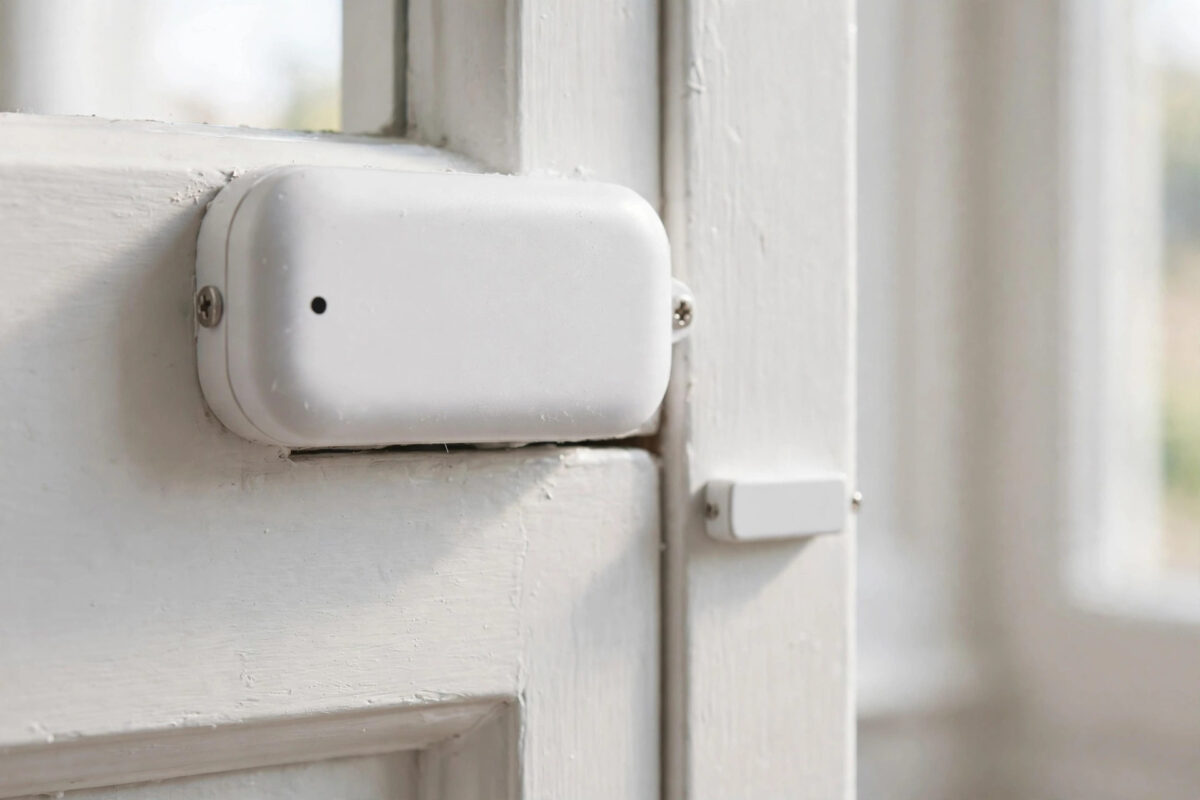
You close the front door. The Aqara app says it is open. You open it wide. The app now says closed. Everything is backwards, so your alerts, automations, and history are all wrong.
This fault looks like a software bug, but in most homes it is a fitting problem. The sensor and its magnet are too far apart, lined up the wrong way, or mounted so the door move confuses them. A few simple checks put the status the right way round again.
Work through the steps below in order. Most people fix this in under 15 minutes without buying anything.
Quick Answer
Line up the marks on the sensor and the magnet so they face each other, with a gap of less than about 22 mm when the door is closed. Mount the larger sensor on the frame and the small magnet on the moving door, on the same level. If the status is still reversed, remove the device from the Aqara app, reset it, and add it again with the door closed during pairing.
How an Aqara Door Sensor Knows Open From Closed
The kit has two parts. The big part is the sensor. It has the battery, the radio, and a small switch inside that reacts to a magnet. The small part is just a magnet in a plastic case. It has no battery and no radio.
When the magnet is close to the sensor, the switch is in one state and the app reports closed. When the door moves and the magnet goes away, the switch changes and the app reports open. That is all it can sense — magnet near, or magnet far.
So a backwards reading usually means one of these things:
- The magnet is close when the door is open, and far when the door is closed, because the parts were fitted on the wrong sides or angles.
- The gap is right on the edge, so the sensor flips between states and the history looks reversed.
- The sensor was paired or reset while the door was open, and an automation or third-party app displays the state inverted.
- The metal door or frame bends the magnetic field and confuses the switch.
If you are new to contact sensors, our roundup of the best smart home sensors for beginners explains where each sensor type works best around the home.
Check the Fitting First
Do not reset anything yet. Look closely at the door with it fully closed.
1. Check Alignment and Gap
- Close the door fully, including pushing it until the latch clicks.
- Find the small line or mark on the side of the sensor and the matching mark on the magnet.
- Check the marks face each other and sit on the same level. One part should not be much higher than the other.
- Measure or judge the gap. Aim for about 10 mm or less for a reliable result. Aqara rates detection up to around 22 mm, but a smaller gap is far more stable.
- Open the door slowly and watch the parts. The magnet should move clearly away, not slide along the sensor and stay near it.
That last point catches a common error: on some doors the magnet slides sideways and stays close as the door starts to open, so the app flips late and the history looks backwards.
2. Check Which Part Is Where
The standard way is sensor on the fixed frame, magnet on the moving door. You can swap them if shapes fit better, as long as marks line up and the magnet moves away cleanly. Never fit the magnet so it comes closer as the door opens.
For sliding doors and windows, fit the parts at the end that separates first when it slides. Test the full slide before you trust the sticky pads.
3. Test by Hand Before You Re-Stick Anything
- Take both parts off if they are only held by pads. Keep the door closed.
- Hold the magnet against the sensor at the marks. Check the app says closed. You may need to wait a few seconds for the update.
- Move the magnet 10 cm away. Check the app now says open.
- Repeat two or three times. If hand testing is correct, the electronics are fine and the fault is pure fitting.
- If hand testing is still backwards, go to the reset steps below.
Hand testing splits the problem in two: fitting fault or pairing fault.
Fix the Mounting
Once hand testing passes, refit with care:
- Clean the frame and door with a dry cloth. Dust and grease weaken sticky pads and let parts creep over time.
- Use new pads or screws if the old pads let the magnet tilt. A tilted magnet changes the gap.
- Fit the sensor first on the frame, level and firm.
- Close the door. Hold the magnet in place with the marks lined up, check the app says closed, then press it on.
- Open and close the door five times slowly. Watch the app history, not just the live icon. Each open and close should appear once, in the right order.
- On a metal door or frame, add a plastic or wooden spacer of a few millimetres under the sensor if the status jumps around. Metal can disturb the switch.
A loose door that rattles can bounce the magnet in and out of range. Tighten the latch so the closed door sits still, then test again.
If Hand Testing Is Still Backwards: Reset and Re-Add
- Open the Aqara Home app and remove the sensor from your home.
- Press and hold the reset button on the sensor for about 5 seconds until the indicator flashes, following the steps in the manual for your exact model.
- Make sure the door is fully closed.
- Add the sensor again in the app, through your Aqara hub, while the magnet is held next to the sensor.
- Wait for pairing to finish. Check the status says closed while the magnet is still in place.
- Move the magnet away and confirm it changes to open, then refit both parts as above.
If you use the sensor in Apple Home, Google Home, Alexa, or another platform, check the status there after the re-add. Sometimes the Aqara app is correct and only the third-party display or an automation is inverted. Delete any old automation that says “when open, report closed” or that was built while the fitting was wrong, and build it fresh. For model-specific steps, Aqara’s official support pages list reset methods for each sensor version.
Other Causes Worth Checking
Low Battery and Distance
A weak battery or a sensor far from the hub can miss updates, so the app shows the last state. That can look reversed. Replace a low battery and check the sensor stays online after you fix the fitting.
Two Sensors Mixed Up
In homes with many doors, it is easy to watch the wrong room in the app. Open one door at a time and see which sensor changes. Rename each sensor with its room and door as soon as it works.
Firmware and App Updates
Update the Aqara Home app and hub firmware, then restart the hub once. After an update, test the door five times and review the log.
Mistakes to Avoid
- Leaving a big gap: A gap near the maximum works on day one and fails when the door swells, shrinks, or sags a little.
- Ignoring the alignment marks: The parts can look lined up from the front and still be offset at the sensing point.
- Pairing with the door open and parts apart: Always pair with the magnet held to the sensor so the first state is clear.
- Trusting one test: Test open and close several times and read the history log. One live glance can miss a delayed flip.
- Sticking pads onto paint dust or damp wood: The magnet creeps, the gap grows, and the fault returns a week later.
- Blaming the app first: Most backwards cases are fixed at the door, with no reset at all.
Conclusion
An Aqara door sensor only knows if the magnet is near or far. If the app shows open and closed backwards, prove it by hand first: magnet on means closed, magnet away means open. Then fix the alignment, close the gap, and mount the parts so the magnet leaves cleanly when the door opens. Reset and re-add with the door closed only if hand testing is also reversed. With a tight, level fitting, the status will match the door every time.
Frequently Asked Questions
What gap should I leave between the Aqara sensor and magnet?
Aim for 10 mm or less when the door is closed, even though the sensor can work at a larger gap. A smaller gap gives a clean, fast change and leaves room for the door to move a little with heat and use.
Can I mount the Aqara sensor on a metal door?
Yes, but metal can affect the magnetic switch and the radio. If readings jump or reverse on a metal door, fit a thin plastic or wooden spacer behind the sensor and magnet, and test by hand in that exact spot before fixing them down.
Why does the status fix itself and then go wrong again?
That pattern points to a borderline gap or a loose fitting. Temperature changes move the door slightly, and a magnet on a weak pad can tilt. Reduce the gap, replace the pads, and make sure the closed door does not rattle in its frame.
Do I need to reset the sensor to fix a reversed status?
Only if hand testing is reversed too. If holding the magnet to the sensor gives the right result, do not reset — just refit the parts correctly. Resetting without fixing the fitting brings the same fault straight back.
The Aqara app is right but Alexa or Google shows it backwards. What should I do?
Remove the sensor from the third-party app and link it again, then check for an old routine that inverts the action. The sensor sends one state; different apps can only display it wrong if an old link or automation is flipping it.



Leave a Reply