
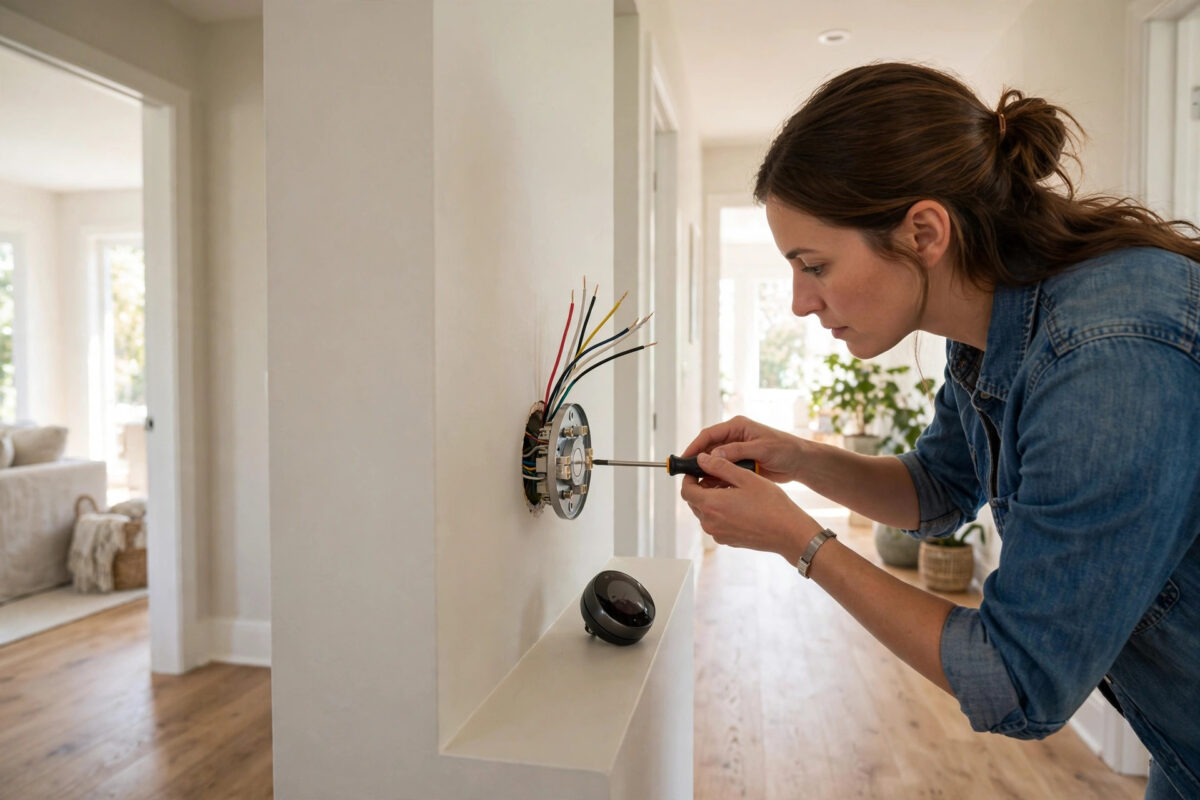
A smart thermostat learns your routine, heats your home only when needed, and lets you turn the heating up from the sofa or down from a beach abroad. Fitting one yourself is a realistic weekend job for many homes — but it involves your heating system and mains wiring, so it must be done carefully and only where you are confident and legally permitted. This guide explains the process step by step, and where to stop and call a professional.
Quick Answer
Turn off power to the heating system, photograph and label the existing thermostat’s wires, remove the old unit, mount the smart thermostat’s backplate, connect the wires to the matching terminals, attach the display, restore power, and complete setup in the app including Wi-Fi and heating schedules. Homes without a common (C) wire or with high-voltage or complex systems may need an adapter or a professional installer.
Before You Start: Compatibility Checks
- Know your system: Smart thermostats suit most gas boiler, combi, and heat pump systems. Electric storage heaters, high-voltage (120–240V direct) thermostats with thick wires, and some proprietary systems (certain boilers with their own digital controls) are not simple swaps — check the manufacturer’s compatibility tool first. In the UK, confirm the thermostat supports your boiler and whether you need a separate receiver/Heat Link (Google Nest) or wired wall unit (Hive, Tado, Honeywell).
- Check for a C wire (US-style systems): Many smart thermostats need constant power from a common wire. If your old thermostat has batteries and no C wire, options include a C-wire adapter kit, using an unused wire in the cable, or choosing a model designed to work without one.
- Tools: Screwdriver set, wire labels or masking tape, a phone for photos, a drill for new wall plugs if the backplate holes differ, and a voltage tester to confirm power is off.
- Safety rule: If at any point the wiring does not match the diagrams, you find damaged cables, or your system is covered by rules requiring a qualified engineer (gas work in the UK must be done by a Gas Safe engineer — though thermostat wiring on the low-voltage side is commonly DIY, anything involving opening the boiler is not), stop and hire a professional. The thermostat makers’ own guides, such as Google’s Nest thermostat installation steps, state the same cautions.
Step-by-Step Installation
Step 1: Turn the Power Off
Switch off the heating system at the breaker/fuse box and at the boiler’s isolator if it has one. Verify: set the old thermostat to call for heat — the boiler should stay silent — and use a voltage tester on the thermostat wires if you have one. Never work on heating wiring live.
Step 2: Document the Old Wiring
Remove the old thermostat’s cover. Before touching a single wire, photograph the wiring clearly. Then label each wire with the letter of the terminal it is attached to (R, W, Y, G, C in US notation; or the numbered/lettered terminals in UK units), using the labels in the new thermostat’s box or your own tape flags. This photograph-plus-labels step is what saves every DIY installer from guesswork later.
Step 3: Remove the Old Thermostat
Disconnect the labelled wires one by one and bend them gently so they cannot slip back into the wall — or tape them to the wall temporarily. Unscrew and remove the old backplate. Keep the old unit and its screws until your new thermostat has run for a week, in case you need to revert.
Step 4: Mount the New Backplate
Thread the wires through the new backplate’s centre opening. If the mounting holes do not match the old ones, mark, drill, and fit wall plugs; use the trim plate in the box to cover old screw holes or paint marks. Level the plate (most backplates include a small bubble level) and screw it firmly to the wall.
Step 5: Connect the Wires
Push each labelled wire into its matching terminal on the new backplate until it clicks or clamp it under its screw, exactly as the manufacturer’s diagram for your system type shows. Tug each wire gently to confirm it is secure. Wire a C-wire adapter at the boiler/furnace end too if your kit includes one and your system needs it — that part of the job is why some people hand the whole task to an installer, and that is fine.
Step 6: Attach the Thermostat and Restore Power
Push the thermostat display onto the backplate until it seats. Turn the power back on at the breaker and boiler. The thermostat should boot within a couple of minutes and greet you with its setup screen.
Step 7: Set Up in the App
- Create your account in the manufacturer’s app and connect the thermostat to your 2.4GHz Wi-Fi.
- Confirm the system type (boiler/heat pump, fuel type) matches your home — the thermostat asks during setup, and wrong answers cause strange heating behaviour.
- Set your location for weather-aware features and accurate times.
- Build a basic schedule: morning warm-up, daytime setback, evening comfort, night setback. Aim a degree or two lower than your old habits to start saving; the U.S. Department of Energy’s thermostat guidance estimates around 10% annual heating and cooling savings from sensible setback schedules.
- Run the equipment test the app offers — it fires the heating briefly to prove the wiring is right. Test it now, not on the first cold night.
- Enable geofencing/home-away features and add household members’ phones if you want automatic away setbacks.
After Installation: First-Week Checks
Check the thermostat responds to manual changes and app changes, and that radiators warm when expected. Learning thermostats (Nest especially) adjust their schedules during the first week — resist correcting them constantly, or learning takes longer. Verify the heating also still works if the internet goes down: every good smart thermostat remains a normal thermostat on the wall without Wi-Fi. Finally, register the product for its warranty.
Common Mistakes to Avoid
- Skipping the wiring photo: The single biggest DIY error. Photograph and label before disconnecting anything.
- Working with the power on: Always isolate and verify.
- Assuming compatibility: High-voltage and proprietary systems are real exceptions. Use the maker’s checker first.
- Discarding the old thermostat immediately: Keep it until the new one has proven itself for a week.
- Wrong system type in setup: Telling the app you have a heat pump when you have a boiler (or vice versa) causes bizarre behaviour. Check the boiler manual if unsure. Thermostat control pairs naturally with the other starter devices in our guide on what you need to start a basic smart home.
Conclusion
Installing a smart thermostat is methodical rather than difficult: power off, photograph, label, swap plates, match wires, power on, set up the app, and test the heating the same day. Respect the compatibility checks and your own limits around boilers and mains wiring, and you will end up with heating that follows your life instead of a timer set in 2019.
Frequently Asked Questions
Can I install a smart thermostat myself, or do I need an engineer?
Many homeowners install like-for-like low-voltage thermostats themselves in under an hour. Hire a professional if your system is high-voltage, the wiring is unclear or damaged, a C-wire adapter must be fitted at the boiler and you are not confident, or local rules require it. In the UK, never open a gas boiler unless you are Gas Safe registered.
What is a C wire and do I need one?
The C (common) wire provides constant 24V power to the thermostat. Older battery-powered thermostats often lack one. Many smart thermostats include or sell an adapter, and some models are designed to work without a C wire by sipping power — check your chosen model’s requirements before buying.
Will a smart thermostat work with my old boiler?
Usually yes for standard gas and combi boilers with conventional thermostat wiring. Very old boilers, systems with proprietary digital controls, and electric high-voltage heating are the exceptions. Every major brand offers an online compatibility checker — use it with your boiler model number.
How much money does a smart thermostat actually save?
Energy agencies estimate roughly 8–10% of heating costs from proper schedule setbacks and away modes, with learning models adding convenience more than extra savings. The biggest saver is simply not heating an empty or sleeping house at full temperature.
Does the thermostat still work if the Wi-Fi goes down?
Yes. The wall unit keeps running its schedule and manual controls without internet; you lose only app control and learning updates until the connection returns. If yours stops heating entirely without Wi-Fi, something is wrong with the setup.


Leave a Reply