
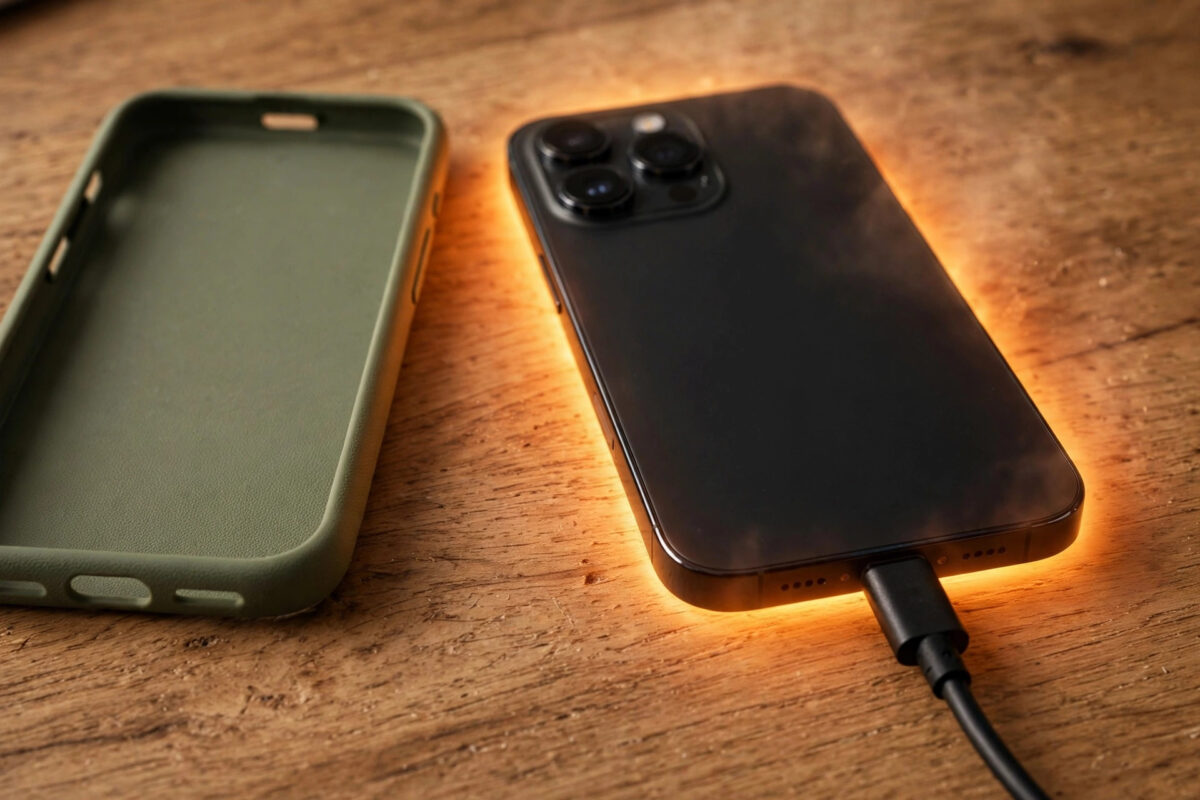
A phone that gets warm while charging is normal. A phone that gets hot to hold, slows down, or stops charging is telling you something is wrong.
Heat is the enemy of battery health. The sooner you find the cause, the longer your battery and phone will last.
Quick Answer
Phones overheat while charging mainly because of fast charging heat, a thick case, heavy use while plugged in, a faulty cable or charger, or a hot room. Remove the case, use the original charger, stop gaming or streaming while charging, and charge on a hard, cool surface. If it still gets very hot, stop charging and check the battery.
How Hot Is Too Hot?
Some warmth during fast charging is expected. The back of the phone may feel warm, especially near the centre or top.
It is too hot if you cannot hold it comfortably, see a temperature warning, or notice charging pause on its own. Those are protective actions by the phone.
Most phones throttle charging speed when hot. You may see a message like charging paused or device temperature too high.
Check the battery temperature if your phone shows it. On Samsung go to Settings > Battery > Battery usage or use Device care. On Pixel, third-party info appears under Settings > Battery.
As a guide, battery temperature under 40°C while charging is fine. Regularly exceeding 45°C will age the battery much faster.
Cause 1: Fast Charging Generates More Heat
Fast charging pushes more power in less time, and that process creates heat. 65W, 100W, and higher chargers run hotter than a basic 15W charger.
Wireless charging is even less efficient. More energy is lost as heat, which is why phones often feel hottest on a wireless pad.
This does not mean fast charging is bad by itself. Manufacturers design for it, but heat builds up faster when other factors are also present.
- If your phone overheats, try a slower standard charger overnight instead of the fastest brick.
- On Samsung, go to Settings > Battery > Charging settings and turn off Fast charging or Super fast charging to test the difference.
- On Xiaomi with HyperOS, go to Settings > Battery > Battery features and reduce the charging speed if the option is available.
- On Pixel, Adaptive Charging in Settings > Battery > Adaptive Charging spreads charging overnight and reduces heat stress.
Cause 2: Using the Phone While It Charges
Gaming, video calls, navigation, and 4K recording load the processor heavily. Doing them while charging adds charging heat on top of processor heat.
Even scrolling social media with high brightness adds noticeable warmth. The screen is one of the biggest heat sources in the phone.
- Let the phone rest while charging, face down on a hard surface with the screen off.
- Turn brightness down or enable Auto brightness in Settings > Display if you must use it.
- Close navigation and camera apps fully instead of leaving them running in the background.
- Avoid video calls on mobile data while charging, as weak signal makes the radio work harder too.
If the phone only overheats when you use it plugged in, this is almost certainly your main cause. Change the habit before changing hardware.
Cause 3: Case, Surface, and Room Temperature
Thick, rubber, wallet, and rugged cases trap heat. Charging under a pillow, on a bed, or in direct sunlight makes the problem far worse.
Phones cool themselves through the back and frame. Blocking that surface stops heat escaping at the exact moment it peaks.
- Remove the case while charging, especially for fast or wireless charging.
- Charge on a wooden desk or ceramic surface, never on bedding, sofas, or inside a bag.
- Keep the phone out of direct sun and away from radiators or a hot car dashboard.
- For wireless charging, align the phone carefully on the pad. Poor alignment wastes more energy as heat.
Many users following our Android tips and guides at Network Ustad find that removing the case alone drops charging temperature noticeably.
Cause 4: Faulty Cable, Charger, or Port
Cheap, damaged, or counterfeit chargers are a major overheating cause. A frayed cable or loose connection creates resistance, and resistance creates heat.
Dirt and lint in the charging port have the same effect. The plug cannot sit properly, and charging becomes unstable.
- Use the charger and cable that came with the phone, or a certified replacement from the same brand.
- Replace any cable with fraying, bent pins, or a plug that feels hot during charging.
- Power off the phone and gently clear lint from the port with a wooden toothpick. Never use metal.
- Try a different wall socket and remove multi-plug adapters that feel warm themselves.
Samsung explains safe charger use in its Samsung support guidance on why Galaxy devices get warm. Follow the wattage your phone supports and avoid unknown brands.
Cause 5: Apps, Updates, and Battery Health
A rogue app running in the background can keep the processor busy for the whole charge. A recent system update can also cause temporary heat while the phone re-indexes files.
An ageing or swollen battery generates more heat and holds less charge. If the back panel bulges or the battery drains unusually fast, treat it seriously.
- Go to Settings > Battery > Battery usage and look for one app using far more power than expected.
- On Samsung, open Settings > Battery and device care and tap Optimise now. On Xiaomi, open Security > Battery and run the check.
- Restart the phone, then charge again without opening many apps, to see if heat returns.
- Check battery health. On Samsung Members app go to Diagnostics > Battery. On Pixel, degraded batteries may show warnings in Settings > Battery.
If heat started right after an update and settles within a day, it is usually normal optimisation. If it lasts for days, investigate apps instead.
Google also notes heat and drain causes in its Google support advice for Android battery and heat issues.
What to Do If Your Phone Overheats Right Now
Act quickly but calmly. You do not need water, a freezer, or any extreme cooling trick.
- Unplug the charger immediately and remove the case.
- Turn on Airplane mode or power the phone off completely if it feels very hot.
- Move it to a cool, shaded, hard surface and let it cool for 15 to 20 minutes.
- Do not charge it again until it feels completely normal to touch.
Never put a hot phone in a fridge or under cold water. Rapid temperature change can cause condensation inside and damage seals.
Common Mistakes and Tips
A common mistake is charging overnight on a bed under a pillow with a thick case on. That combination traps heat for hours.
Another mistake is buying the highest-wattage charger you can find, even if your phone supports far less. Extra wattage does not help and poor-quality bricks add risk.
Tip: charge in shorter bursts between 20% and 80% when you can. The final 20% is often the slowest and warmest phase.
Tip: keep software updated and uninstall apps you no longer use. Fewer background apps means less heat on every charge.
Conclusion
Occasional warmth while charging is normal, but repeated overheating shortens battery life and signals a fixable problem. Start with the simple wins: remove the case, rest the phone while it charges, use a genuine charger, and charge on a cool hard surface. If heat persists with a good charger and no heavy use, check battery health and seek a repair before the battery suffers permanent damage.
Frequently Asked Questions
Is it normal for a phone to get warm while fast charging?
Yes, mild warmth is normal with fast and wireless charging because more power moves quickly and some is lost as heat. It should never be uncomfortable to hold. If it is, remove the case, slow the charging speed, and stop using the phone while it charges.
Can overheating while charging damage my battery?
Yes. Repeated high heat accelerates battery wear, reducing capacity and lifespan over months. Phones protect themselves by slowing or pausing charging, but regularly charging in hot conditions will still age the battery faster than charging in a cool room.
Should I stop using wireless charging if my phone gets hot?
Not necessarily, but try wired charging to compare. Wireless is less efficient and usually warmer. Good alignment, a quality pad, and removing the case help a lot. If wireless is consistently very hot, use wired charging instead.
Why does my phone stop charging when it gets hot?
That is a built-in safety feature. When temperature exceeds a safe limit, Android slows or pauses charging and may dim the screen or close apps. Let the phone cool fully, then charge again in a cooler place with a genuine charger.
When should I take an overheating phone for repair?
Seek repair if the phone overheats on a slow genuine charger with no apps running, if the back is bulging, or if you smell a sweet chemical odour. Those can indicate a failing battery, which should not be used or charged at home.
Leave a Reply