
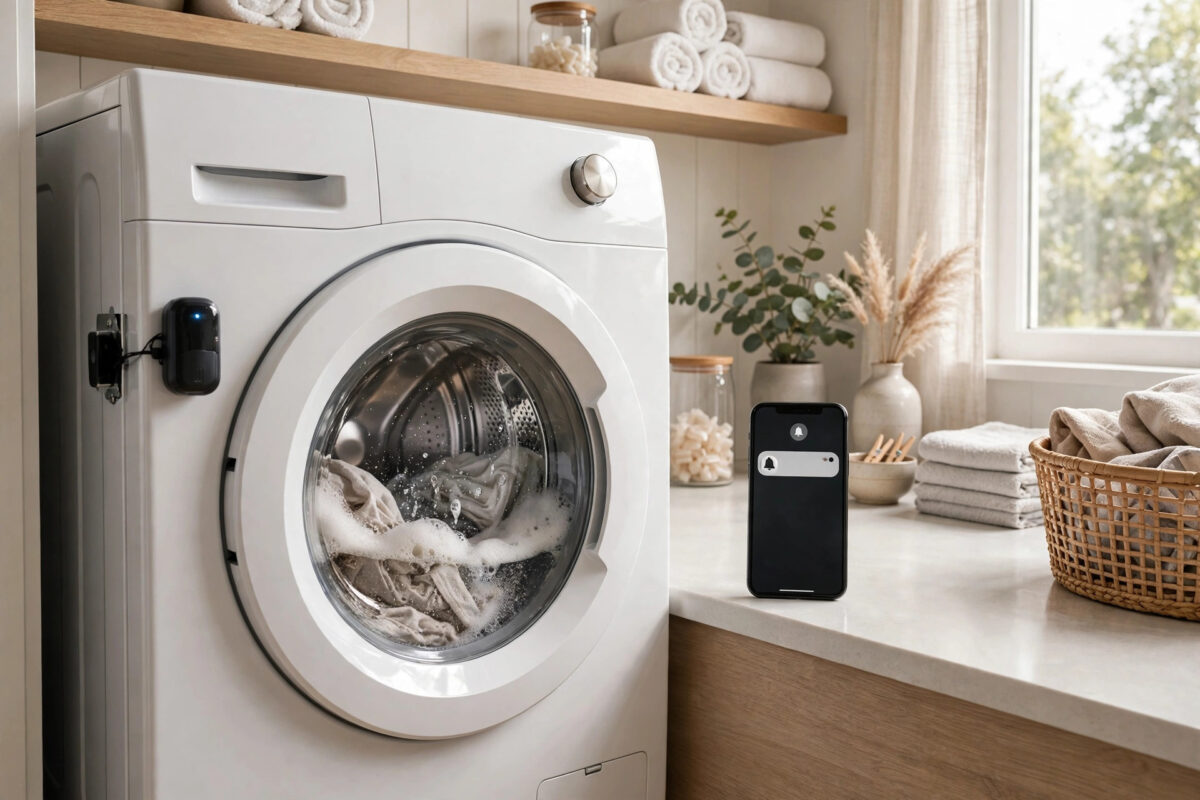
Everyone knows the laundry trap. You put a wash on, get busy, and completely forget it. Hours later the clothes are still sitting in the drum, damp and starting to smell, and the whole load needs washing again. A dryer has the same problem: clean clothes sit cooling and creasing while you do something else.
A tiny vibration sensor offers a simple fix that works with almost any machine, smart or not. Stick it on the washer or dryer, teach your smart home what movement means, and get a phone alert the moment the cycle truly ends. This guide shows you how to set it up, tune it, and avoid the false alerts that make people give up.
Quick Answer
Attach a vibration or multipurpose sensor firmly to the side or top of your washer or dryer, then create an automation that starts when vibration begins and sends you a notification after vibration has stopped completely for five to ten minutes. The quiet period is the key part, because it stops the mid-cycle pauses in a wash from triggering a false “laundry done” alert.
Why Vibration Works Better Than a Smart Plug Alone
There are two popular ways to detect a finished cycle. A smart plug with power monitoring watches electricity use, while a vibration sensor watches movement. Both can work, but vibration has some real advantages for many homes.
- It works on gas dryers and machines where a smart plug is not suitable for the electrical load.
- It needs no wiring and no changes to the machine itself.
- One sensor can be moved between the washer and dryer in seconds.
- It detects the physical end of tumbling and spinning, not just a drop in power.
Vibration is not perfect. A sensor that is too sensitive will react to a closing door or a heavy footstep, and one that is not sensitive enough will miss a gentle final spin. The tuning steps later in this guide deal with both problems.
Choosing and Placing the Sensor
Most multipurpose sensors that report vibration, acceleration, or movement will do this job. Popular examples include SmartThings-style multipurpose sensors, Aqara vibration sensors, and similar Zigbee or Z-Wave devices that pair with your hub or app.
Where to stick it
- Clean a flat area on the side or top edge of the machine with a dry cloth so the adhesive pad holds well.
- Pick a spot that shakes clearly during a spin, but is not on the door, where opening and closing causes sharp knocks.
- Press the sensor on firmly and wait a few minutes for the pad to bond.
- Open your app and confirm you can see the sensor and its vibration status.
- Run a short cycle and watch the readings to confirm the sensor reports active during the wash and inactive when the machine rests.
Metal machine panels can weaken some wireless signals. If the sensor keeps going offline in a utility room, move your hub closer or add a mains-powered repeater device nearby.
Step 1: Name and Test the Sensor Properly
- Add the sensor to your platform and give it a clear name, such as Washer Vibration.
- Tap or shake it gently by hand and check that the app shows vibration detected.
- Leave it still on a table and confirm the status changes back to no vibration.
- Note how long the sensor takes to report that it has become still. Some devices have a built-in quiet period of one to three minutes.
That built-in quiet period matters later. If your sensor already waits two minutes before reporting stillness, you may only need a short extra delay in your automation, not a long one.
Step 2: Build the Laundry Done Automation
The most reliable rule has two parts: first it learns that a cycle has started, and then it waits for a solid block of stillness before telling you the laundry is done.
- Create a new automation or routine in your app.
- Set the first condition: when vibration becomes active, mark the laundry as running. Some platforms do this with a virtual switch or a helper that turns on.
- Set the second rule: when the “running” helper is on and vibration has been inactive for five to ten minutes, send a phone notification.
- Use clear alert wording, such as “Washing machine finished — move the clothes to dry.”
- Turn the running helper off after the alert, so the next cycle starts cleanly.
- Save everything and run a real load to test the full sequence.
Simpler platforms that cannot use a helper can still do a basic version: trigger when vibration stops, wait ten minutes, check that there is still no vibration, and then notify. It is less elegant, but the final check before notifying catches most false alarms on its own.
If you would like alerts spoken aloud as well as sent to your phone, our companion guide on getting smart speaker announcements for laundry and appliances shows how to add voice alerts on Alexa and Google speakers.
Step 3: Tune Out False Alerts
A normal wash is not one long vibration. The machine fills, tumbles, pauses, drains, and spins, with quiet gaps in between. If your alert fires mid-cycle, the stillness delay is simply too short.
- Alert arrives during the wash: Increase the quiet period from five minutes to ten or even fifteen.
- Alert never arrives: Lower the sensor sensitivity slightly or shorten the delay, and check the sensor has not gone offline.
- Alert fires when the door slams: Reduce sensitivity and move the sensor away from the machine door.
- Two machines confuse each other: A washer shaking beside a dryer can trigger the dryer’s sensor. Separate them if you can, or lower sensitivity on both.
Give the system three or four real loads before judging it. One odd cycle, such as a small load of shoes, will shake very differently from normal clothes and bedding.
Extra Ideas Once the Basic Alert Works
Once the end-of-cycle alert is reliable, you can build small extras on top of it, as long as you keep the main notification simple and dependable.
- Flash or turn on a hallway light in a gentle colour when the cycle ends.
- Send the alert only to the person who started the load, using separate routines per family member.
- Add a reminder that repeats every 30 minutes until someone opens the machine door, if your sensor also reports open and close or tilt.
- Log cycle counts in a note or dashboard if you like tracking energy habits.
For platform-specific steps on notification triggers, the SmartThings support site documents how routines handle device status and delays, which is useful when your first version behaves unexpectedly.
Helpful Tips for Reliable Results
- Replace the battery early: A weak battery makes readings patchy. Change it when your app first reports it low, not weeks later.
- Re-check the adhesive every few months: Heat and vibration slowly loosen pads. A sensor that slides down the machine will read poorly.
- Test after moving the machine: Pulling the washer out for cleaning changes how it vibrates. Run one watched cycle afterwards.
- Keep the alert wording action-based: “Move washing to the dryer” works better than “Vibration stopped” because it tells you what to do.
- Do not stack both machines on one sensor: One sensor per machine is far more accurate if you want separate washer and dryer alerts.
Conclusion
A vibration sensor turns any ordinary washer or dryer into a machine that tells you when it has finished. Stick the sensor on a spot that shakes well, build an automation that waits for five to ten minutes of true stillness, and tune the delay over a few real loads. After that, forgotten laundry becomes rare, and the musty rewash cycle finally ends.
Frequently Asked Questions
Where is the best place to put a vibration sensor on a washing machine?
A flat spot on the top edge or upper side of the machine usually works best. It shakes clearly during spins, stays away from door knocks, and keeps the sensor easy to reach when the battery needs changing.
Why do I keep getting laundry alerts in the middle of a cycle?
Your quiet period is too short for the pauses built into your wash program. Increase the no-vibration delay to ten or fifteen minutes so short mid-cycle gaps do not count as the end.
Can one sensor monitor both my washer and dryer?
Not reliably if they run at the same time or sit side by side, because movement from one machine confuses the reading for the other. Use one sensor per machine for clear, separate alerts.
Does a vibration sensor work on a stacked washer and dryer?
It can, but the whole stack shakes together, so telling the two machines apart is hard. Placing each sensor as close as possible to its own machine and lowering sensitivity helps, though results vary.
What if my sensor keeps going offline in the laundry room?
Metal appliances and thick walls weaken the signal. Move the hub closer, add a mains-powered smart plug or bulb nearby to act as a signal repeater, and keep the sensor on the side of the machine facing the hub.



Leave a Reply