
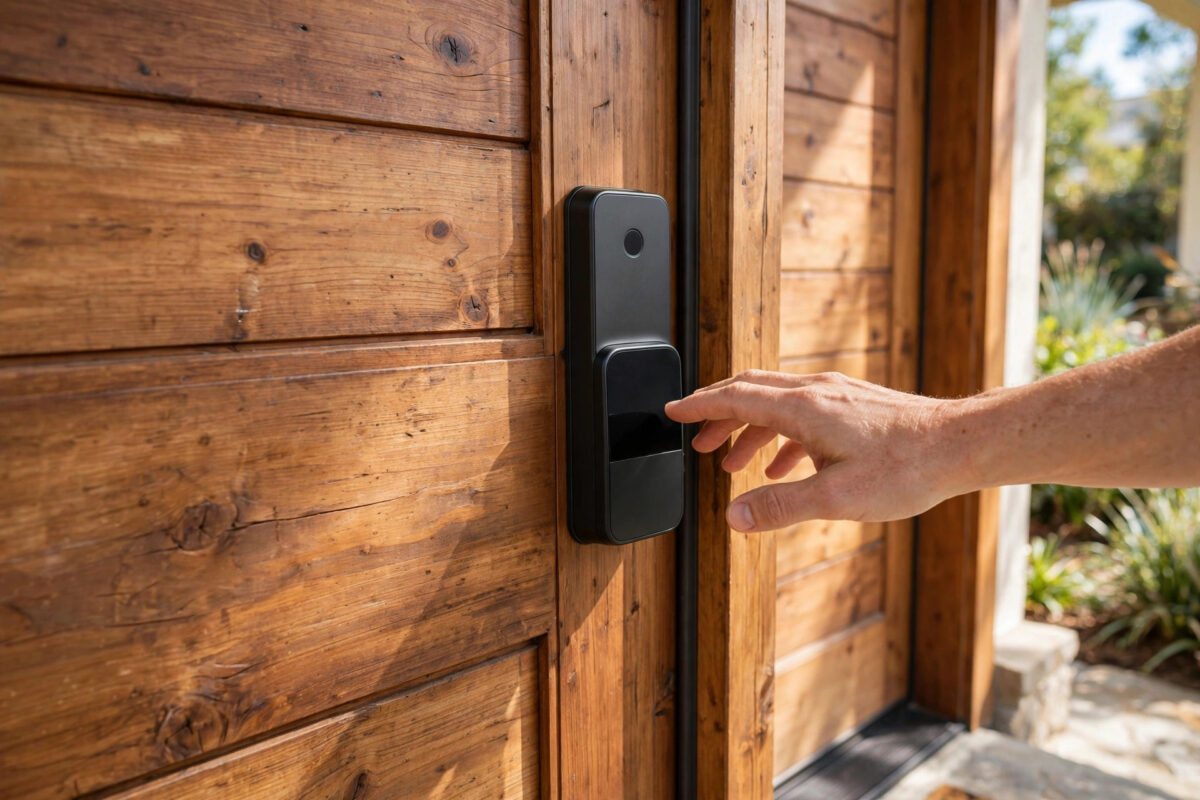
A smart lock lets you unlock your front door with a code, a fingerprint, your phone, or even your voice — and check from anywhere whether you actually locked up. Fitting one sounds like a job for a locksmith, but most modern smart locks are designed for ordinary DIY: they replace the inside half of your existing deadbolt using nothing more than a screwdriver. This guide walks through choosing, fitting, and securing one properly.
Quick Answer
Choose a smart lock that fits your door type and existing deadbolt (or buy a full replacement lock if yours is incompatible). Remove the interior side of your old deadbolt, mount the smart lock’s plate, attach the motor unit, insert batteries, and connect it to its app over Bluetooth or Wi-Fi. Then set your access codes, test the lock with the door open and closed, and enable auto-lock.
Before You Buy: Check Compatibility
Most installation problems are really purchase problems. Confirm these first:
- Door type and thickness: Most smart locks suit doors 35–55mm thick. uPVC and composite doors with multipoint locking (common in the UK) need specific models — look for locks explicitly listed as multipoint or Euro cylinder compatible.
- Existing hardware: Retrofit locks (from brands like Yale, August, and Nuki) fit over your existing deadbolt or cylinder, so your outside keyhole and keys stay unchanged — ideal for renters. Full replacement locks swap everything.
- Connectivity: Bluetooth-only locks work when you are nearby. For remote control and voice assistants you need Wi-Fi — built in, or via a small bridge that plugs in near the door.
- Power: Almost all run on AA batteries lasting 6–12 months. Check that the app warns you well before they die, and that the lock still accepts a physical key or an emergency USB power contact from outside.
Step-by-Step Installation
Step 1: Prepare the Door and Old Lock
Tape the outside half of the existing deadbolt to the door so it cannot fall out when you remove the interior thumb turn. Photograph the current setup — it is a useful reference if you ever refit the old lock. Keep the door open (or have someone hold it) during the whole install so you can test without ever locking yourself out.
Step 2: Remove the Interior Thumb Turn
- Unscrew the two screws holding the inside thumb turn or interior plate.
- Remove the interior half, leaving the bolt and the exterior key cylinder in place.
- Check the tailpiece (the flat metal bar through the door) — the smart lock’s adapter must match its orientation, vertical or horizontal.
Step 3: Fit the Mounting Plate and Adapter
Screw the smart lock’s mounting plate onto the door using the screws provided, passing the tailpiece through it. Fit the correct adapter for your cylinder or deadbolt brand — kits include several, and picking the wrong one is the most common cause of stiff or noisy operation. The plate should sit flat and firm with no wobble.
Step 4: Attach the Smart Lock Unit
Clip or screw the main unit onto the plate so its motor engages the adapter. Insert the batteries. The lock will usually beep or light up and move the bolt once as a self-test. Turn the manual thumb turn slowly: the bolt should glide smoothly. If it grinds or stalls, realign the adapter before continuing — forcing a misaligned motor burns battery and wears the mechanism.
Step 5: Connect the App and Calibrate
- Install the manufacturer’s app and create your account with a strong, unique password and two-factor authentication.
- Add the lock over Bluetooth while standing next to it.
- Run the calibration: the lock learns the fully locked and fully unlocked positions of your bolt. Follow the prompts exactly, with the door first open, then closed, as instructed.
- Connect Wi-Fi or the bridge if your model supports it, and check for firmware updates.
The Google Nest support centre and each manufacturer’s own help pages publish model-specific calibration steps if your lock behaves oddly at this stage.
Step 6: Set Codes, Users, and Auto-Lock
Create individual codes for each family member rather than one shared code, so you can revoke access for a person without changing everyone’s. Add time-limited codes for cleaners or dog walkers if the app supports schedules. Turn on auto-lock (30 seconds to 2 minutes after closing) and the door-ajar warning if a door sensor is included. Finally, enable notifications for lock and unlock events during the first weeks so you can confirm everything behaves as expected — and consider how this fits with the wider security habits in our guide on protecting smart home devices from hackers.
Testing Before You Trust It
Test from outside with your phone, with a code, and with the physical key, while another person stays inside. Lock and unlock ten times in a row; the motion should be consistent. Check the app reports the correct state every time. Only then remove the tape, tidy up, and keep the old thumb turn and screws in a labelled bag — you may want them when you move.
Common Mistakes to Avoid
- Closing the door before testing: Always complete calibration and testing with the door open first.
- Wrong adapter: Stiff, noisy turning almost always means the wrong cylinder adapter was fitted.
- One shared code for everyone: Individual codes are the whole point of a smart lock’s security.
- Weak account security: A lock is only as secure as its app account — use a unique password and two-factor authentication.
- Ignoring low-battery warnings: Replace batteries at the first warning, not after the lock dies.
Renting, Insurance, and Other Practical Points
A few real-world details are worth settling before you fall in love with keyless entry. If you rent, retrofit locks that leave the exterior unchanged are usually acceptable, but check your lease and tell your landlord — some require that they hold a working key or code. For homeowners, check your home insurance: some policies specify lock standards for doors (such as BS3621 in the UK), and a replacement lock that downgrades the door’s certified hardware could complicate a claim, while retrofit models that keep the original cylinder avoid the issue entirely. Keep one physical key with a trusted neighbour or in a secure key safe as your ultimate backup, rather than under a mat or plant pot. Finally, think about who else needs codes — children without phones, elderly relatives, regular carers — and choose a lock with a keypad or fingerprint option if not everyone in the household is app-friendly.
Conclusion
Fitting a smart lock is a one-hour DIY job: check compatibility, swap the interior hardware, calibrate carefully, and set up individual codes with auto-lock. Take your time on alignment and testing, and you gain keyless entry, an activity log, and the peace of mind of checking your front door from anywhere.
Frequently Asked Questions
Can I still use my old keys with a smart lock?
With retrofit models like Nuki or August, yes — the outside cylinder is unchanged, so your existing keys work as a backup. Full replacement locks come with their own new keys. Either way, keeping a physical backup is strongly recommended.
What happens if the batteries die while I am out?
Most locks give weeks of low-battery warnings before failing. If they do die, your physical key still works, and many models have emergency USB contacts on the outside where a power bank can briefly power the lock for one entry.
Will a smart lock work on a uPVC door?
Standard deadbolt locks will not. You need a model designed for multipoint mechanisms or Euro cylinders, such as the Yale Conexis or Ultion Nuki ranges, which are built specifically for UK-style doors. Always filter by door type before buying.
Do smart locks need Wi-Fi?
No — Bluetooth models work fully for codes, fingerprints, and app control when you are near the door. Wi-Fi (built in or via a bridge) adds remote locking, real-time alerts, and voice assistant control from anywhere.
Are smart locks secure against hacking?
Reputable models use encrypted connections and are generally harder to defeat than a basic pin-tumbler lock is to pick. The realistic risks are weak account passwords and shared codes, so enable two-factor authentication and give each person their own code.

Leave a Reply